Two Retool defaults will ruin a screenshot integration before you finish building it. One makes it fail; the other makes it expensive.
The first is a 10-second query timeout, which is shorter than a cold render of a heavy page. The second is that GET queries re-run whenever their parameters change — so a URL text input wired directly to a paid screenshot API can trigger repeated captures while you type.
Both are query settings worth checking before the first capture.
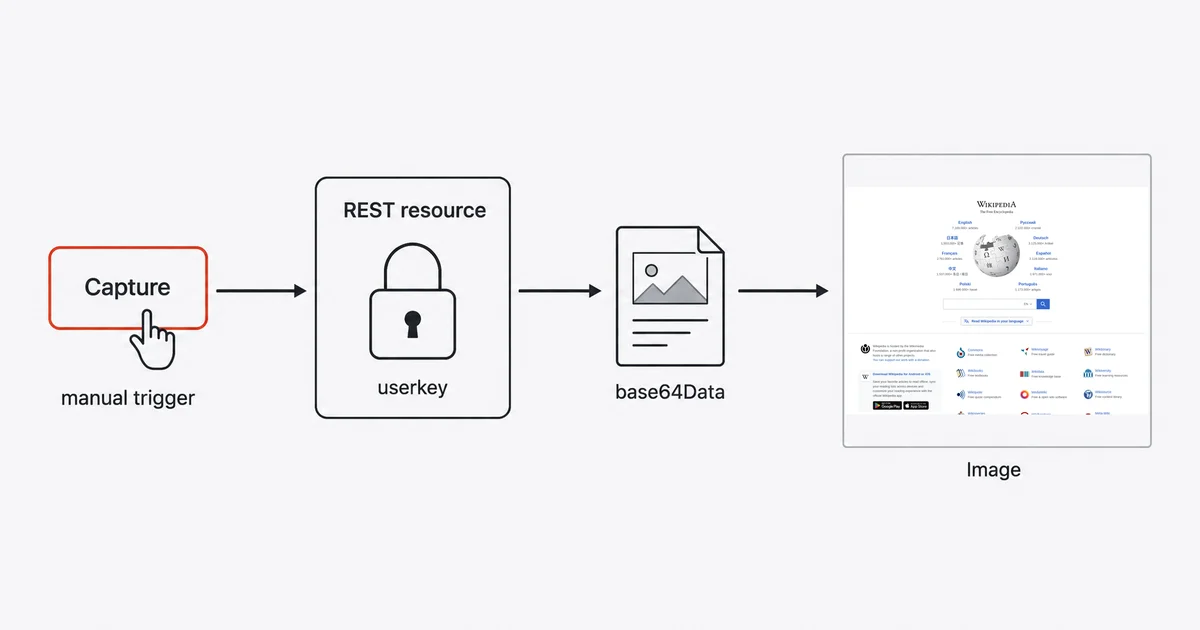
The short answer
- Create a REST API resource with base URL
https://api.site-shot.com/, and add a resource header nameduserkeyholding your key. - Add a query against it. On the Advanced tab, set Run query only when manually triggered and raise Timeout after to something realistic.
- Drop an Image component and set its Image source to JS, bound to the query result.
Do not put the screenshot API URL into the Image component's src. That is the version that leaks your key.
Retool hands you a file object, not bytes
The first genuinely surprising thing: Retool converts a binary response for you, silently, into a shape you did not ask for.
A GET through a REST resource that returns image bytes comes back as a Retool file object — the same schema as a Retool Storage file:
{
  "name": "tryretool",
  "type": "image/png",
  "sizeBytes": 4551,
  "base64Data": "iVBORw0KGgoAA..."
}
The raw bytes are never exposed. You always consume base64Data. This is good news — no base64 mode to request from the vendor, no hosted URL required — but it is impossible to guess, and it changes how you bind the result.
Three ways to display it:
- Image component, source = JS. Bind the query output directly; the component's
srcTypeenum has aretoolFileObjectvalue for exactly this. Cleanest path. - Image component, source = URL. Assemble the data URI yourself:
data:image/png;base64,{{ screenshotQuery.data.base64Data }}. Needed for components without a real image field. - HTML
<img>tag in a Text component or a table's HTML column, using the same data URI.
One caution before you write the binding. Retool's two documentation pages disagree about this object's schema: the images guide shows the MIME field named data, while the files page shows the REST response with it named type. Open the query inspector and look at the live object rather than trusting either page — including this one.
The 10-second wall
"Retool automatically times out queries that run for longer than 10 seconds (10000ms)."
Screenshot APIs regularly take longer than that — and not only on heavy pages. Measured, Site-Shot renders https://example.com, a two-paragraph static page, in about 10.8 seconds, already past the ceiling before any network transit. So the tutorial fails on the very first run rather than on the first site the reader actually cares about — with a timeout that reads like the screenshot vendor's fault.
Raise it on the query's Advanced tab. Retool Cloud caps out at 120 seconds; self-hosted instances set DBCONNECTOR_QUERY_TIMEOUT_MS, and if there is a load balancer in front, its timeout needs raising proportionally too.
Retool Workflows has the same trap separately: "The default timeout is 10 seconds and is configurable with block settings."
The money bug
This one deserves its own heading because it costs real money and nothing warns you.
"Queries using GET methods automatically run whenever any of their parameters change by default (e.g., input field value changes)."
Build the obvious app — a text input for the URL, an Image component below it — and every character typed into that input fires a screenshot render. Retool's default throttle is 750ms, so a user typing a 30-character URL does not trigger 30 captures, but they trigger a great many more than one.
The fix is a radio button on the same Advanced tab: Run query only when manually triggered. Then add a Capture button and wire it to the query.
Set manual triggering before testing the query with a real key.
Where the key goes, and the two places it leaks
Put it on the resource, not in the app. Retool is explicit: "if your API requires authentication, create a REST API resource instead — resources securely encrypt credentials and authentication details." Queries execute server-side, so the key never reaches the browser.
Send it as a header, not a URL parameter. Site-Shot accepts the key either way — a userkey: header with nothing in the query string returns the image — and on Retool specifically the header is strictly safer, for a reason that is a happy accident of naming.
Retool's log sanitization covers headers only: "Retool sanitizes any headers with keys that contain authorization, key, or password." Our header is called userkey, which contains key, so it is redacted automatically. Set it under the resource's headers — "Headers set on resource configuration pages are always included on any requests using that resource."
If you do put the key in the query string instead, that sentence does not cover you, and you need the separate opt-in: "Add sensitive parameters to the Disable logging for field on the Advanced tab in the query editor. In the audit logs, these parameter values display as --blacklisted-by-developer--."
The Image component's URL mode fetches from the viewer's browser. Point it at https://api.site-shot.com/?url=...&userkey=... and every user of the app can read your key from devtools. Routing through a resource query executes server-side and keeps the API key out of the image URL sent to viewers.
A note on the recommended-looking option: configuration variables are gated two ways. They are "available to cloud instances and self-hosted instances using versions 3.4.0 and later for organizations on a Business or an Enterprise plan," and even then "Secret configuration variables are not available in apps and queries." So on Free and Team the key lives in the resource config, which is the right place anyway.
One trap that is not ours, but is worth knowing
Retool rewrites your query string: "URL parameters are automatically sorted alphabetically. To disable sorting, navigate to Settings > Beta and turn on the Disable URL Params Sorting setting."
That is harmless for a plain key-in-the-query API. It is not harmless if your screenshot vendor uses HMAC-signed request URLs, where the signature is computed over a specific parameter order — reordering invalidates it, and the resulting error tells you nothing useful. If you are evaluating signed-URL screenshot APIs on Retool, test that specifically.
Screenshotting a list of URLs
For anything batch-shaped, use Workflows rather than an app, and know the ceilings.
Resource blocks run up to 10 minutes on asynchronous workflow runs, 2 minutes on synchronous ones. Outbound concurrency is capped: "Retool limits the number of in-flight outbound requests to 50 at a time from a single workflow." Loop blocks default to a batch size of 10 per batch, which you will want to raise or lower depending on how long your renders take. A workflow run may use up to 2.5 GB of memory on Cloud — enough to hold a lot of base64 image data, but not unlimited, and base64 is about a third larger than the bytes it encodes.
Honest limits
Retool Cloud egresses from a fixed IP set. It "uses the AWS us-west-2 region, based in Oregon, US" by default. That matters only if your screenshot vendor allowlists by IP, in which case it is helpful rather than limiting.
Base64 in app state is not free. Every capture you keep bound to a component lives in the browser's memory as a base64 string. A table of fifty full-page screenshots is a heavy app. Store the images somewhere and display thumbnails.
This is a dashboard, not a monitor. Retool is an excellent place to look at screenshots on demand. Scheduled capture with alerting is a different tool.
FAQ
What does a Retool query return when the API responds with an image?
A Retool file object with the fields name, type, sizeBytes and base64Data. Retool converts binary responses automatically, so the raw bytes are never exposed and you always read base64Data. Note that two Retool documentation pages disagree on whether the MIME field is called type or data, so check the live object in the query inspector.
Why does my screenshot query time out in Retool?
Because Retool automatically times out queries that run longer than 10 seconds, which is shorter than a cold render of a heavy page. Raise Timeout after on the query's Advanced tab. Retool Cloud allows up to 120 seconds, and self-hosted instances configure the maximum through an environment variable.
Why is my screenshot API being called on every keystroke?
Because queries using GET methods automatically run whenever any of their parameters change, including input field values. That can trigger repeated paid captures while someone types, subject to the query's default 750ms throttle. Select Run query only when manually triggered and drive the query from a button instead.
Can I put the screenshot API URL directly in an Image component?
You can, but it makes the viewer's browser fetch the image, which exposes your API key in devtools. Route the request through a REST API resource query instead, which runs server-side and keeps the key out of the browser.
Is an API key in a URL parameter redacted from Retool audit logs?
Not automatically — but you can sidestep the question. Retool sanitizes headers whose names contain authorization, key or password, and Site-Shot accepts its key as a userkey header, whose name contains key, so sending it as a resource header gets it redacted for free. If the key must go in the query string, add its name to the Disable logging for field on the query's Advanced tab, where the value then appears as blacklisted by developer.
Related reading
- How to Take Website Screenshots in Bubble — the other app builder, where one type dropdown decides everything.
- How to Take Website Screenshots in Airtable — when the data, not the interface, is the point.
- How to Take Website Screenshots in Cloudflare Workers — building the key-hiding proxy yourself.
- Screenshot API documentation — every parameter used above.
Site-Shot returns a PNG from a plain GET, which is exactly the shape Retool's REST resource converts into a file object for you — no base64 mode to request, no hosting step. See the plans.