You have a table of websites. Competitors, client sites, portfolio links, a directory you are building. The URLs are there, and every one of them is a blue link you have to click to remember what it is.
An attachment column with a picture of each page fixes that, and Airtable can fill it automatically. The catch is the attachment field's input format: fetching image bytes and handing them directly to the field does not work.
Airtable's attachment field does not accept bytes. It accepts a URL, and Airtable's own servers go and fetch it.
That keeps the script short: build the URL and update the record.
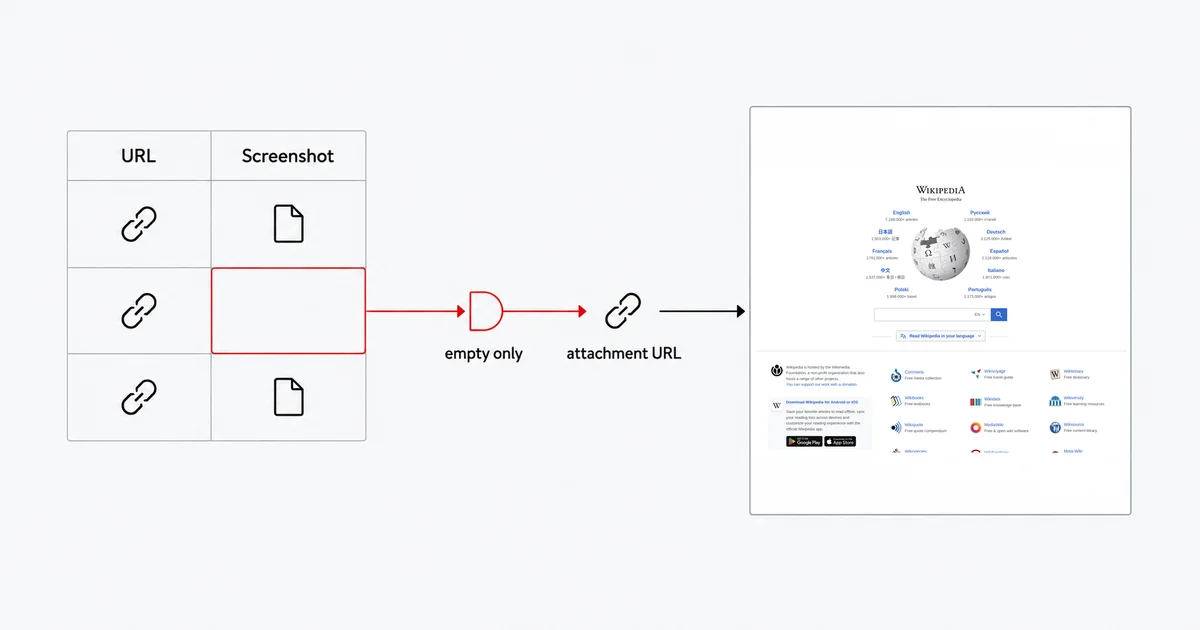
The short answer
Write a screenshot-API URL into the attachment field and let Airtable download it. The script never touches the image. The tradeoff you are making is that the URL contains your API key, and it is Airtable's servers doing the fetching — if that matters for your account, there is a second route below that keeps the key inside the script.
The mechanism: hand Airtable a URL
Airtable's scripting reference gives the write format for an attachment cell as:
Array<{
    url: string,
    filename?: string,
}>
New attachments only require the url property. That is the whole interface — you build a URL that returns an image, put it in the array, and Airtable does the rest.
The automation, end to end
Create a table called Sites with a URL field (call it URL) and an Attachment field (call it Screenshot).
Then add an automation. Trigger: When record matches conditions, where URL is not empty and Screenshot is empty — this matters, and the next section explains why. Action: Run a script. Add an input variable named recordId and map it to the triggering record's Airtable record ID. Airtable's automation guide explains input variables.
In the action's Secrets section, click Add existing secret and add your Site-Shot API key. Then:
const table = base.getTable("Sites");
const { recordId } = input.config();
const record = await table.selectRecordAsync(recordId);
if (!record) throw new Error("The triggering record no longer exists.");

const target = record.getCellValue("URL");
const key = input.secret("SITESHOT_API_KEY");

const shot = "https://api.site-shot.com/?" + new URLSearchParams({
    url: target,
    userkey: key,
    full_size: "1",
    no_ads: "1",
    no_cookie_popup: "1",
});

await table.updateRecordAsync(record, {
    "Screenshot": [{ url: shot, filename: "capture.png" }],
});
no_ads and no_cookie_popup are doing real work. Without them a large share of your captures will be a cookie consent wall, which is both a useless thumbnail and a full-price screenshot.
Airtable's docs note that secrets are "limitedly redacted from console functions like console.log" — limitedly, not completely. Do not log the built URL while debugging.
The trap: an automation that triggers itself
Writing to Screenshot changes the record. If your automation is triggered by "when a record is updated" on the same table, that write triggers it again, which writes again, and every one of those runs counts against your automation quota whether it succeeded or not.
Gate the trigger on the work being unfinished — a view or condition of "Screenshot is empty" — so a record that already has its capture cannot re-enter the queue. Otherwise, repeated updates can quickly use up your automation allowance.
One more sharp edge in the same area: Airtable's scripting docs state that when you update an attachment cell "the specified array will overwrite the current cell value". If you want to keep a history rather than replace it, spread the existing value first:
const existing = record.getCellValue("Screenshot") || [];
await table.updateRecordAsync(record, {
    "Screenshot": [...existing, { url: shot, filename: "2026-09-02.png" }],
});
Where your API key ends up
Be clear-eyed about what the simple version does: the string you write into the attachment field contains userkey=YOUR_API_KEY, and Airtable's servers make the request. Your key travels to Airtable. Whether Airtable retains the source URL on the stored attachment object is not something its documentation states, so treat it as if it might.
For most bases that is a perfectly reasonable trade — it is your own base, your own key, and the key can be reset. If it is not acceptable for yours, the other route is Airtable's direct upload endpoint, which takes the image as base64 and does not need the Site-Shot key:
POST https://content.airtable.com/v0/{baseId}/{recordId}/{attachmentFieldIdOrName}/uploadAttachment
It requires contentType, file (the base64 encoded string of the file to be uploaded) and filename, and it accepts attachments up to 5 MB. Airtable's own guidance for anything larger is to go back to the public-URL route. So: fetch the capture from your own backend where the key stays, base64 it, and POST it in. More moving parts, no Site-Shot key sent to Airtable, and a 5 MB ceiling that a long full-page PNG can genuinely exceed.
Pick the one that matches how sensitive the key is. Do not pick the second one by default — it is meaningfully more work.
Attachment URLs expire
A detail that bites people building anything on top of the base: Airtable's field-model documentation states that attachment "URLs returned will expire 2 hours after being returned from our API."
The stored attachment remains in the base; the link you read back is temporary. If you are syncing the base into a static site, a dashboard, or anywhere that caches URLs, you cannot store what Airtable hands you and expect it to resolve tomorrow. Re-read it at use time, or copy the file into your own storage.
Making the captures cheap and readable
A directory of 400 sites does not need 400 full-page screenshots at desktop resolution.
- Drop
full_sizeand passwidthandheightfor a viewport shot. The top of the page is what makes a row recognisable in a grid. max_heightcaps a full-page capture that would otherwise run to twenty thousand pixels on a long landing page.format=jpegfor photo-heavy pages; keep PNG where the page is mostly text and UI, which stays sharper.
Every capture counts as one screenshot against your plan, the same as an API call from anywhere else.
Capturing from another country
Add a two-letter ISO 3166-1 country code and the render routes through a real IP address in that country, along with the language, time zone and geolocation defaults that go with it:
const shot = "https://api.site-shot.com/?" + new URLSearchParams({
    url: target,
    userkey: key,
    country: "DE",
    strict_country: "1",
    no_ads: "1",
});
Use the two-letter ISO 3166-1 code, such as country=DE, rather than a country name.
strict_country=1 is worth adding by default in an automation. Without it, a country whose proxy pool is momentarily exhausted falls back to a US render and stores a screenshot that looks completely normal and is of the wrong country. Nothing in your base will indicate that. With it, the request fails fast instead — an image-mode call comes back HTTP 404, so Airtable has no successful capture to attach. Your "Screenshot is empty" view then shows exactly which rows to retry. (The literal "error": "country_unavailable" body exists only in response_type=json mode, where it arrives with HTTP 200 — so check the error field if you switch to JSON mode.)
Geotargeting comes with any paid plan. The country list follows live proxy capacity, so it changes — the current one is on the countries page.
Where the honest limits are
"Run a script" is not on the free plan. Airtable gates the scripting automation action behind its paid plans. If you are on Free, the attachment-by-URL trick still works — you just have to write the URL into the field by other means, such as an external integration that updates the attachment field through Airtable's API, rather than an automation script.
Pages behind a login will not capture. The API renders public URLs. A members-only page returns whatever a logged-out visitor sees.
Automation runs are metered per workspace, and failed runs count too. That is the real reason the self-triggering loop above matters: it consumes quota, not merely space in the run history.
This is a screenshot, not a monitor. Filling a column once is a snapshot. If what you want is the same URL captured on a cadence with the changes flagged, that is a different job and we build it in — see scheduled screenshots, which needs no automation platform at all.
The free browser tool has no API. site-shot.com captures any page with no signup, which is the fastest way to see what a capture of your target looks like before you wire anything up. It is a browser tool, not a free API tier; the API needs a key, and plans start at $5/mo for 2,000 screenshots.
FAQ
How do I put a website screenshot into an Airtable attachment field? Write a screenshot-API URL into the attachment field as an array of objects — Airtable's scripting reference gives the write format as an array of objects with a url property, where new attachments only require url. Airtable's servers then download the image from that URL themselves, so your script never handles the image bytes.
Why can't my Airtable script upload the screenshot bytes directly? Because the attachment field's write format takes a URL, not binary data. To hand Airtable actual bytes you have to use the separate upload endpoint at content.airtable.com, which takes the file as a base64 encoded string and accepts attachments up to 5 MB; Airtable's guidance for anything larger is to add it from a public URL instead.
Does putting my API key in an Airtable attachment URL expose it? The key travels to Airtable's servers, because Airtable is the party that fetches the URL you wrote into the field, and Airtable's documentation does not state whether the source URL is retained on the stored attachment. For a base where that is unacceptable, fetch the capture on your own backend and POST it as base64 to the uploadAttachment endpoint so Airtable never receives your Site-Shot key.
Why does my Airtable screenshot automation keep running over and over? Because writing to the attachment field updates the record, which re-fires an automation triggered on record updates to the same table. Trigger it on a condition that the work is unfinished, such as a view where the Screenshot field is empty, so a record that already has a capture cannot re-enter the queue.
Do Airtable attachment URLs stop working? The stored attachment remains in the base, but the link is temporary — Airtable's field-model documentation states that attachment URLs returned will expire 2 hours after being returned from its API. Re-read the URL at the moment you use it, or copy the file into your own storage if you need a stable link.
The free Site-Shot browser tool captures any public page with no signup — try one of your URLs before you build the automation. For the API, plans and pricing start at $5/mo for 2,000 screenshots.