You are building something in Bubble that lists websites. A directory, a portfolio, a competitor tracker, a link library. Each row has a URL, and each row looks like every other row, because a URL is not something a person recognises at a glance.
What you want is a thumbnail of the actual page in an image field. Bubble can do this with its API Connector plugin and no code — but there is one dropdown that decides whether you get a picture or a screenful of binary garbage, and the failure mode is confusing enough that it fills forum threads.
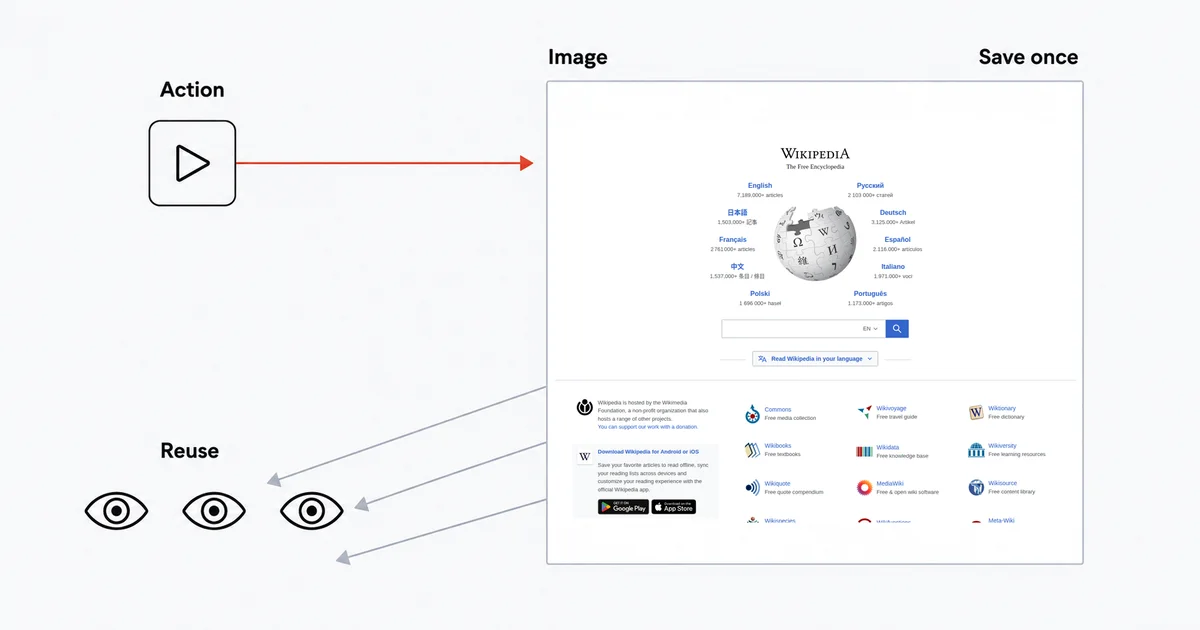
The short answer
Add an API Connector call to the screenshot API, set the returned value's type so Bubble knows the response is an image, and use it as an Action inside a workflow that saves the result to an image field. Bubble's documentation is explicit about the payoff: "If an API returns an image, the API call in Bubble will return an image that can be used in an Image element, or as a page background."
Set up the call
In the Plugins tab, install API Connector, then add an API. Name it Site-Shot.
Set the authentication for the whole API to a private key in the URL, with the key name userkey and your Site-Shot key as the value. This matters more than convenience — see the section on where the key lives below.
Add a call:
- Name:
Capture screenshot - Use as:
Action - Method:
GET - URL:
https://api.site-shot.com/
Add these as parameters:
| Key | Value | Private? |
|---|---|---|
url |
the page to capture | unticked |
full_size |
1 |
ticked |
no_ads |
1 |
ticked |
no_cookie_popup |
1 |
ticked |
Untick Private on url only. That is the one value your workflow needs to change per call; everything else stays server-side.
no_ads and no_cookie_popup help keep ads and supported cookie banners out of the thumbnails. Check a few target pages, since removal is not guaranteed for every site.
The setting that decides everything
After you initialize the call, Bubble asks what the returned value is. This is the step people miss.
The screenshot API returns the image itself as the response body — not JSON with a link in it. If Bubble interprets that response as text, you get the raw bytes rendered as characters, and the usual reaction is to assume the API is broken. It is not; Bubble was told to expect the wrong thing.
Set the returned value's type so Bubble treats the response as an image. Once you do, the call's result is a Bubble image, usable directly in an Image element or saved into an image field on a thing.
If initialization shows you a wall of unreadable characters, do not start debugging the API. Change this setting first.
Data call or Action call
Bubble's docs describe the split cleanly: "Data calls appear in the 'Get data from an external API' dropdown menu and Action calls appear in the Plugins section of the Actions dropdown menu."
For screenshots you almost always want Action, and the reason is money.
A Data call is an expression used to load data for the interface. Putting a capture request in a repeating group's image source couples paid API calls to displaying the list. An Action makes the capture timing explicit instead.
An Action runs once, inside a workflow, when you tell it to. Capture the screenshot, save it to an image field on the thing, and subsequent views can reuse it without another screenshot API call:
- Workflow trigger — a button, or "Do when condition is true" on a thing with an empty screenshot field.
- Plugins → Site-Shot – Capture screenshot, with
urlset to the thing's URL. - Make changes to a thing → set the image field to
Result of step 1.
Capture once, then reuse the saved image.
Where the key lives
Bubble's manual is unusually direct about this: "All calls made through the API Connector are routed through Bubble's server by default. This keeps your API credentials, parameters, and other sensitive data secure, since none of it ever passes through the user's device."
That default is doing real work for you. Your Site-Shot key sits in the API Connector's authentication, the request goes out from Bubble's servers, and a visitor inspecting your page's source finds nothing.
There is an option to let a call run directly from the browser instead — and Bubble notes that only data calls can use it, while actions and initialization still run through Bubble. Turning it on for a call that carries your API key hands that key to every visitor. If you ever enable browser execution to shave latency somewhere, make sure it is not on the call that authenticates.
Marking parameters Private is the same instinct at the field level. url has to be exposed because the workflow sets it; nothing else does.
Initialization is a real capture
Bubble warns: "Take caution when utilizing initialization API calls as they may produce actual outcomes, including the modification of live data."
For a screenshot API the outcome is mundane but real — initializing spends one screenshot from your plan, every time you press the button. It is easy to burn a dozen while fiddling with parameters. Use a small, fast page as your initialization target rather than the heaviest site in your database.
Keep the images small
A full-page capture of a long marketing site can be several megabytes, and in an app you are storing and serving that image to every visitor afterwards.
- Drop
full_sizeand passwidthandheightfor a viewport capture. For a directory thumbnail the top of the page is the recognisable part. max_heightcaps a full-page capture that would otherwise run to twenty thousand pixels.format=jpegis meaningfully smaller on photo-heavy pages; keep PNG where the page is mostly text and UI, which stays sharper.
Each capture counts as one screenshot against your plan, the same as any other API call.
Capturing from another country
Add a two-letter ISO 3166-1 country code as a parameter and the render routes through a real IP address in that country, with the matching language, time zone and geolocation defaults:
| Key | Value |
|---|---|
country |
DE |
strict_country |
1 |
Use the two-letter ISO 3166-1 code, such as country=DE, rather than a country name.
Add strict_country=1 if the country actually matters. Without it, a country whose proxy pool is momentarily exhausted falls back to a US render and returns a perfectly ordinary screenshot of the wrong country — and nothing in your app will indicate it. With it, the call fails fast instead: the image-mode request this page sets up returns HTTP 404, so your workflow can leave the field empty and retry. Branch on the status code — the literal "error": "country_unavailable" body only appears in response_type=json mode, and there it comes back with HTTP 200.
Geotargeting comes with any paid plan. The current country list is on the countries page and moves with live proxy capacity.
Where the honest limits are
Pages behind a login will not capture. The API renders public URLs, so a members-only page returns what a logged-out visitor sees.
This is a capture, not a monitor. Filling an image field once is a snapshot. If you want the same URL re-captured on a cadence with a note when it changes, that is a different product and we build it in — see scheduled screenshots, which needs no app around it at all.
Bubble is a shared neighbour. API Connector calls go out from Bubble's infrastructure, which your app shares with others on non-dedicated plans. That is a general property of building on Bubble rather than something specific to screenshots, but it is worth knowing when you are diagnosing an intermittent failure that your own code cannot explain.
There is no official Site-Shot plugin. This guide uses the API Connector rather than a dedicated screenshot plugin. The upside is that you are not depending on a third party's wrapper staying maintained — the plugins that wrap other screenshot APIs on the Bubble marketplace are mostly built by people unaffiliated with those vendors.
The free browser tool has no API. site-shot.com captures any public page with no signup, which is the quickest way to see what a capture of your target looks like before you build the workflow. It is a browser tool, not a free API tier; the API needs a key, and plans start at $5/mo for 2,000 screenshots.
FAQ
How do I take a website screenshot in Bubble? Add an API Connector call to a screenshot API with the method set to GET, set the returned value's type so Bubble treats the response as an image rather than text, and use the call as an Action in a workflow that saves the result into an image field. Bubble's documentation states that if an API returns an image, the API call in Bubble will return an image that can be used in an Image element, or as a page background.
Why does my Bubble API Connector call return unreadable characters instead of an image? Because the call's returned value is being interpreted as text while the API is sending the image itself as the response body. Change the returned value's type so Bubble treats the response as an image, and re-initialize the call — the API is not the problem.
Should a Bubble screenshot call be a Data call or an Action? Use an Action when you want to control when a paid capture happens. A Data call loads data for the interface; an Action runs in a workflow. Save the Action result to an image field so later views can reuse it without another screenshot API call.
Is my API key safe in the Bubble API Connector? By default, yes. Bubble's manual states that all calls made through the API Connector are routed through Bubble's server by default, which keeps your API credentials, parameters and other sensitive data secure since none of it ever passes through the user's device. Mark every parameter except the target URL as Private, and do not enable browser-side execution on a call that carries your key.
Can a Bubble app screenshot a website from another country? Yes. Add a two-letter ISO 3166-1 country code such as DE as a parameter to route the render through a real IP address in that country, and add strict_country so that an exhausted country pool fails the request outright with an HTTP 404 instead of silently falling back to a United States render. Geotargeting is included with any paid Site-Shot plan.
The free Site-Shot browser tool captures any public page with no signup — try one of your URLs before you build the workflow. For the API, plans and pricing start at $5/mo for 2,000 screenshots.