You want <img src="/shot?url=https://example.com"> on your page, and you want your screenshot API key nowhere near the browser. A Cloudflare Worker is the obvious place to put that proxy.
Then you read that Workers Free gives you 10 milliseconds of CPU time, and a full-page render takes several seconds, and you conclude this cannot work.
It works. The 10ms is not measuring what you think it is measuring.
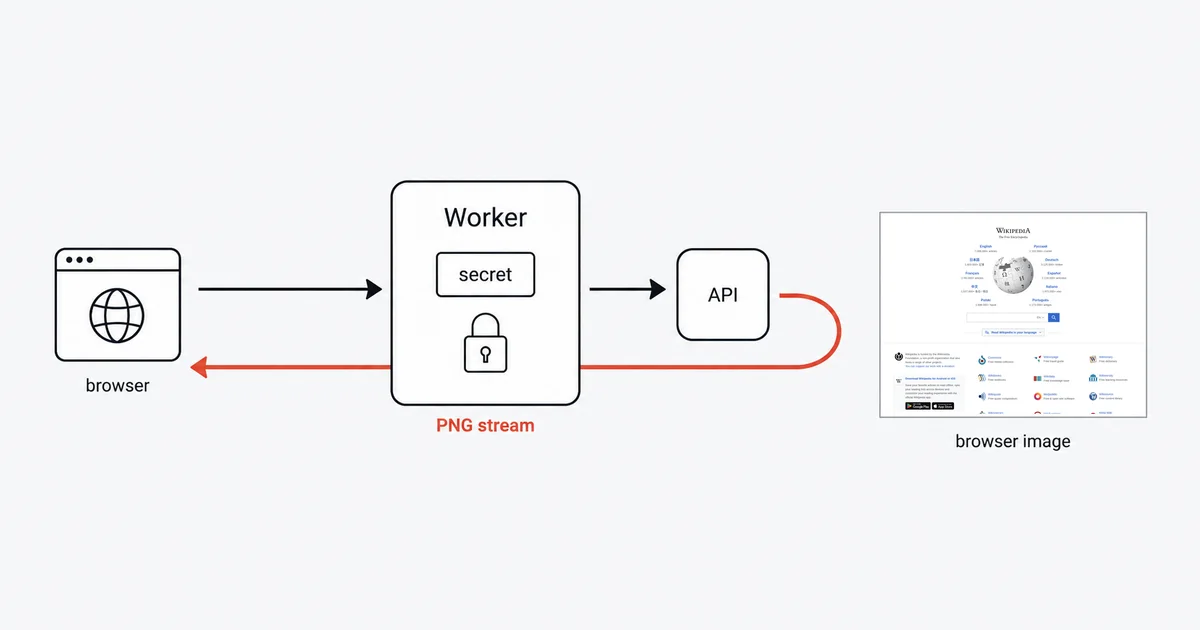
The short answer
export default {
  async fetch(request, env, ctx) {
    const target = new URL(request.url).searchParams.get("url");
    if (!target) return new Response("missing ?url=", { status: 400 });

    const api = new URL("https://api.site-shot.com/");
    api.searchParams.set("url", target);
    api.searchParams.set("userkey", env.SITE_SHOT_KEY);
    api.searchParams.set("full_size", "1");
    api.searchParams.set("no_ads", "1");
    api.searchParams.set("no_cookie_popup", "1");

    const upstream = await fetch(api);

    // Check the status BEFORE streaming. A refused capture comes back non-2xx
    // and its body can still be a valid PNG error card, which a browser will
    // happily draw as though it were your screenshot.
    if (!upstream.ok) {
      return new Response(`capture failed: ${upstream.status}`, { status: 502 });
    }

    // Do NOT read the body. Hand the stream straight back.
    return new Response(upstream.body, upstream);
  },
};
Set the key once and it never appears in the bundle or the browser:
npx wrangler secret put SITE_SHOT_KEY
That is the whole integration. The rest of this article is the two things that will bite you.
Why 10ms is not the limit that matters
Cloudflare's limits page is explicit, and this single sentence is the most useful non-obvious fact about running screenshot work on Workers:
"CPU time measures how long the CPU spends executing your Worker code. Waiting on network requests (such as
fetch()calls, KV reads, or database queries) does not count toward CPU time."
Your Worker parses a URL, builds another URL, and returns a stream. That is well under a millisecond of actual CPU. The eight seconds spent waiting for the page to render are spent by the screenshot API, on someone else's machine, and they cost you nothing against the budget.
The wall clock is not a problem either: "There is no hard limit on duration for HTTP-triggered Workers. As long as the client remains connected, the Worker can continue processing, making subrequests, and streaming a response body."
This is the reverse of Lambda, Cloud Run, and most function platforms, where you pay for wall time and a slow render costs real money. On Workers, proxying a slow API is close to free — which makes it an unusually good fit for exactly this job.
If you do blow the CPU budget, you will know: Cloudflare returns Error 1102 with "Worker exceeded resource limits", surfacing in analytics as exceededCpu. Paid plans start at 30 seconds of CPU and can be raised to five minutes, but a proxy that never touches the bytes will not get close.
The trap in Cloudflare's own documentation
This one is worth naming precisely, because you will not be at fault when it happens to you.
Cloudflare's Integrations page demonstrates calling a third-party API like this:
const data = await response.json();
return new Response(data);
Copy that shape for a screenshot API and you get a corrupted or empty image. A PNG is not JSON, and calling .json() or .text() on an image response destroys it.
The correct rule lives on a different page — Streams — and says the opposite:
"If your Worker only forwards subrequest responses to the client verbatim without reading their body text, then its body handling is already optimal and you do not have to use these APIs."
So: never read the body. response.body is already a ReadableStream of bytes, and the Response constructor accepts it directly. When you need to adjust headers, rewrap rather than re-read — Cloudflare's own cache example annotates the reason in a code comment: "Must use Response constructor to inherit all of response's fields."
If you genuinely need the bytes — to hash the image, or hand a fixed buffer to R2 — use arrayBuffer(). Just never .json().
Caching, and the four things that make it not work
A screenshot is expensive to produce and cheap to reuse, so caching is the whole reason to build this proxy rather than call the API from your origin. Four documented behaviours shape what you get.
A response body is single-use. You cannot return the image to the browser and write it to R2 or the cache from the same object. response.bodyUsed exists precisely to tell you this. Clone it, as Cloudflare's cache example does: ctx.waitUntil(cache.put(cacheKey, response.clone())).
Background writes must be handed to waitUntil, or they vanish. This is the subtle one:
"An async call that is neither awaited nor passed to
ctx.waitUntil()can be canceled when the invocation ends — dropping logs, leaving writes unfinished, or failing silently."
A Worker that returns the image and then fires an R2 write without waitUntil appears to work perfectly while losing an unpredictable fraction of captures. waitUntil buys you up to 30 seconds after the response is sent.
The cache is per-datacenter, not global. "The Cache API is available globally but the contents of the cache do not replicate outside of the originating data center." A screenshot cached in Frankfurt is a miss in São Paulo. Your real hit rate — and your upstream bill — will be worse than a single-location test suggests.
Cache calls spend your subrequest budget. "Calls per request is the number of put(), match(), or delete() Cache API calls per request. This shares the same quota as subrequests (fetch())." On Workers Free that shared ceiling is 50 per invocation, so a match/fetch/put pattern costs three per URL, not one.
One more, purely to save you an afternoon: Cache API operations "in the Cloudflare Workers dashboard editor and Playground previews will have no impact." Your caching is not broken; you are testing it somewhere it does not run. Cloudflare notes that "Workers deployed to custom domains have access to functional cache operations."
Keeping the key a secret
Use a Worker secret, not a plaintext variable. Cloudflare draws the line clearly:
"The difference is secret values are not visible within Wrangler or Cloudflare dashboard after you define them."
and, plainly: "Do not use plaintext environment variables to store sensitive information."
npx wrangler secret put SITE_SHOT_KEY creates a new version of the Worker and deploys it immediately. For local development, put the value in .dev.vars or .env beside your Wrangler config — and keep that file out of git.
The reason this whole pattern is worth building: the key exists only inside the Worker. The browser sees /shot?url=..., and never the credential. That is a real security improvement over calling a screenshot API straight from front-end code, which is a mistake people make regularly and discover through their billing page.
Honest limits
Six concurrent connections per invocation. "Each Worker invocation can have up to six connections simultaneously waiting for response headers." A seventh is queued rather than rejected, but if you are fanning out to screenshot twenty pages in one request, you are serialising in batches of six whether you meant to or not.
Subrequests are capped and redirects count. Fifty per invocation on Free, and "Each subrequest in a redirect chain counts against this limit."
Set-Cookie silently disables caching. "Responses with Set-Cookie headers are never cached." If the upstream API sets one, your cache does nothing and nothing tells you.
Two things I could not verify, so I am not going to claim them. Whether cf: {cacheKey} is genuinely Enterprise-only — Cloudflare's example annotates it as such in a code comment while the Request API reference documents it with no plan restriction, and the two pages disagree. And whether cf: {cacheTtl} behaves the same on a *.workers.dev subdomain as on a custom domain on a zone. If caching matters to your design, test both on your own plan rather than trusting any tutorial, including this one.
FAQ
Does the 10ms CPU limit on Workers Free prevent proxying a screenshot API?
No. Cloudflare measures CPU time as time spent executing your code, and waiting on network requests such as fetch calls does not count toward it. A Worker that builds a URL and returns the upstream stream uses well under a millisecond of CPU no matter how long the render takes, and HTTP-triggered Workers have no hard duration limit while the client stays connected.
Why is my screenshot corrupted or empty in a Cloudflare Worker?
Almost certainly because the code calls response.json or response.text on an image response. Cloudflare's own third-party API example shows that shape, and it destroys binary data. Return fetch directly, or rewrap the stream with the Response constructor, and never read the body of an image.
How do I return the image and cache it at the same time?
Clone the response. A body can only be consumed once, so use response.clone for the copy you store and hand the original back to the client. Wrap the storage call in ctx.waitUntil, because an async call that is neither awaited nor passed to waitUntil can be cancelled when the invocation ends, failing silently.
Why is my Cloudflare cache hit rate so much lower than expected?
Because Cache API contents do not replicate between data centers. A response cached in the originating data center will not exist in another one unless it is explicitly created there, so a globally distributed audience produces far more upstream calls than a single-location test suggests.
Where should the screenshot API key live in a Worker?
In a Worker secret, set with wrangler secret put and read as env.YOUR_KEY inside the fetch handler. Secret values are not visible in Wrangler or the dashboard after you define them, and Cloudflare explicitly advises against using plaintext environment variables for sensitive information.
Related reading
- How to Take Website Screenshots in GitHub Actions — the other platform where the HTTP call is easy and the defaults are the danger.
- How to Take Website Screenshots in Pipedream — where returning the bytes is the thing that breaks it.
- Screenshot API for AI Agents and MCP — the same proxy idea, aimed at tools rather than browsers.
- Screenshot API documentation — every parameter used above.
Site-Shot returns a PNG from a plain GET, which is what makes the Worker above a five-line pass-through instead of a rendering service you have to operate. See the plans.