There is a "Send any HTTP Request" action in Pipedream. It is the obvious way to call a screenshot API, and it is the wrong one — not because it fails loudly, but because it does not fail at all. It hands the next step a mangled string where an image should be.
The reason is one sentence in Pipedream's own documentation: "Any data exported from a step must be JSON serializable; the data must be able to stored as JSON so it can be read by downstream steps." A PNG body is not JSON serializable. Nothing in the no-code builder tells you that.
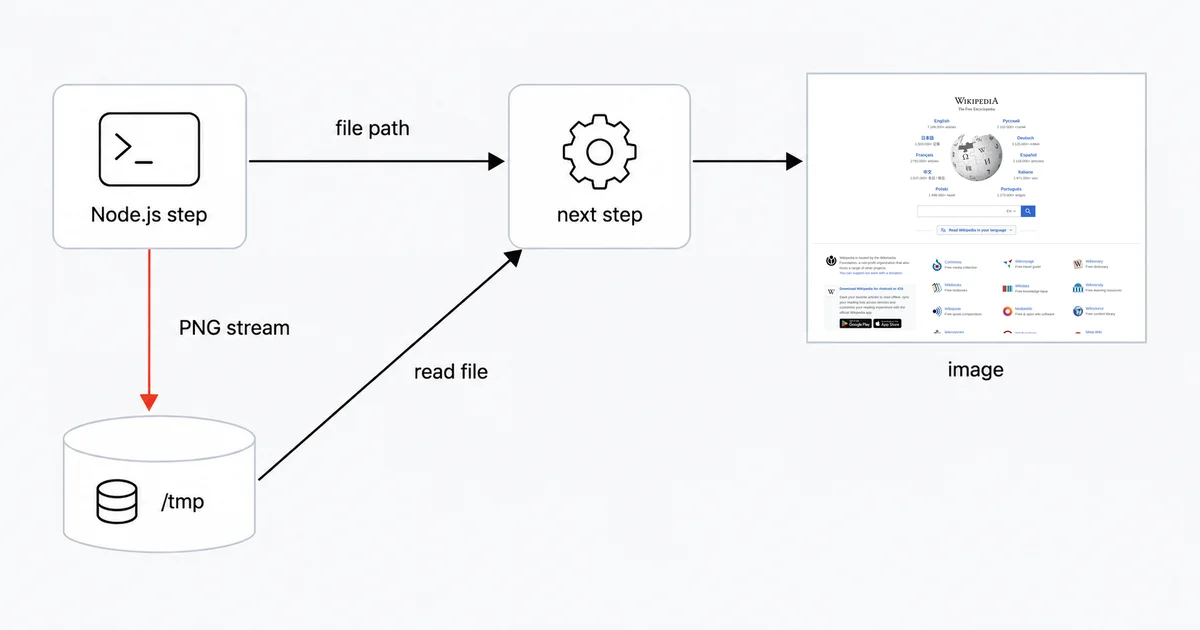
So the working pattern on Pipedream is not "fetch the image and pass it on." It is fetch the image, write it to disk, and pass on the path.
The short answer
Use a Node.js code step, not the HTTP action. Stream the response into /tmp, and return the file path as the step export. Downstream steps read the file from that path.
This workaround comes from the two leading screenshot components already merged into Pipedream's public registry and from Pipedream's own troubleshooting guidance for payload limits.
The working code step
import { axios } from "@pipedream/platform";
import fs from "fs";
import stream from "stream";
import { promisify } from "util";

export default defineComponent({
  props: {
    pageUrl: { type: "string", label: "Page URL" },
  },
  async run({ steps, $ }) {
    const pipeline = promisify(stream.pipeline);
    const filePath = `/tmp/shot-${Date.now()}.png`;

    // process.env must be read INSIDE run() — see the gotcha below.
    const fileStream = await axios($, {
      url: "https://api.site-shot.com/",
      params: {
        url: this.pageUrl,
        userkey: process.env.SITESHOT_API_KEY,
        full_size: 1,
        no_ads: 1,
        no_cookie_popup: 1,
      },
      responseType: "stream",
    });

    await pipeline(fileStream, fs.createWriteStream(filePath));

    return filePath; // the path — never the bytes
  },
});
Two details carry all the weight.
responseType: "stream" is what keeps the PNG intact. Without it the body is decoded as text and the image is destroyed silently. arraybuffer works equally well if you prefer to buffer and then fs.promises.writeFile.
return filePath is the part people get wrong. Returning the buffer, or .toString("base64"), puts the whole image into the step export — and step exports are capped.
Why returning the bytes breaks
Pipedream enforces a combined ceiling: "The total size of console.log() statements, step exports, and the original event data sent to the workflow cannot exceed a combined size of 6MB." The docs add, flatly, that "This limit cannot be raised."
A full-page screenshot of a long page clears 6MB without trying. Base64 encoding makes it worse, not better.
Pipedream's troubleshooting page prescribes exactly the fix used above: "You can avoid this error by writing that data to the /tmp directory in one step, and reading the data into another step, which avoids the use of step exports and should keep you under the payload limit."
You have room to do it. /tmp gives you 2GB of read-write space.
It is worth knowing that the registry disagrees with itself here. The ScreenshotOne and CaptureKit components both write to /tmp and return the path. The Browserless component returns screenshot.toString("base64") in its step export. If you learn the pattern by reading merged components, you can learn the wrong one.
/tmp does not survive between runs
This rule often breaks scheduled screenshot workflows.
Pipedream is explicit: "This means that you should not expect to have access to files across executions. At the same time, files may remain, so you should clean them up to make sure that doesn't affect your workflow."
Read that twice. Files may remain. A daily "screenshot the page and compare it against yesterday's" workflow that leaves /tmp/shot.png in place will be wrong most days and accidentally right on some of them — which is far harder to debug than a clean failure. Timestamp your filenames, as above, and unlink what you are done with.
If you need the image to outlive the execution, move it somewhere durable inside the same run: upload to S3, Drive, or Slack before the step ends.
The File Store trap
Pipedream has a File Store, and await file.toUrl() looks like the clean way to get a shareable screenshot link. Two facts make it a poor default.
It is short-lived: "The File.toUrl() will expire after 30 minutes." Write that URL into a database or paste it into a Slack message and you have posted a link that dies before lunch.
It is plan-gated: "At this time File Stores are only available to Advanced plan and above subscribed workspaces." A reader on a lower plan following a File Store tutorial hits a wall with no workaround.
It is also Node-only — Pipedream states that "only Node.js includes a helper to interact with the File Store programmatically within workflows." Python steps stay on /tmp:
def handler(pd: "pipedream"):
    import os, requests
    r = requests.get("https://api.site-shot.com/", params={
        "url": pd.steps["trigger"]["event"]["page_url"],
        "userkey": os.environ["SITESHOT_API_KEY"],
        "full_size": 1,
    })
    r.raise_for_status()
    with open("/tmp/shot.png", "wb") as f:
        f.write(r.content)
    return "/tmp/shot.png"
Where the key goes
Put it in an environment variable, never in the code. Pipedream's guidance is direct: "You shouldn't include API keys or other sensitive data directly in your workflow's code."
New variables "default to secret", and sharing is safe — "If you share a workflow that references an environment variable, only the reference is included, and not the actual value."
Then avoid the two ways people leak it anyway.
Do not log the built URL. Because the key rides in the query string, and because "Logging the value of any environment variables — for example, using console.log — will include that value in the logs associated with the cell," a single debug log drops your key into the execution inspector. Pass the key through params as in the code above, so it is never part of a string you might print.
Do not read process.env at the top of the file. Pipedream warns that "process.env will always return undefined when used outside of the defineComponent export." Build the URL at module scope and you get userkey=undefined and a 401 that looks like a bad key.
Timeouts, memory, and why not Puppeteer
Defaults are shorter than you think. HTTP and Email-triggered workflows "default to 30 seconds per execution"; Cron-triggered ones "default to 60 seconds." A heavy full-page render plus transfer can exceed 30 seconds and surface as a generic timeout. Raise it in workflow Settings — free workspaces top out at 300 seconds, paid at 750.
Memory defaults to 256MB, adjustable up to 10GB.
That last number is the argument against doing it yourself. Pipedream's own browser-automation guidance says Puppeteer wants 2GB "for best results," and credits are charged in proportion to memory. Running a headless browser in the workflow costs roughly eight times per execution what an API call at default memory costs, and you inherit the fonts, the cookie banners, and the maintenance.
Honest limits
A few things this pattern does not solve.
Outbound IPs are not fixed. Pipedream sends requests "from a large range of IP addresses," so IP allowlisting on the API side is not available to you. The documented fix is a VPC, which sits on the Business plan.
npm versions float. "By default, Pipedream deploys the latest version of the npm package each time you deploy a change." A workflow that works today can break on an unrelated redeploy. Pin imports — import got from "got@14.4.2" — if that matters to you.
The HTTP trigger is rate limited to an average of 10 requests per second, returning 429 above it. Screenshotting a large URL list should be driven by a queue, not by hammering the trigger.
Site-Shot is not yet in the Pipedream registry. There is no no-code Site-Shot action to drag in; the code step above is the integration. Worth noting that the registry bar is low and uneven — ApiFlash has a registered app slug whose directory contains a 12-line boilerplate file and zero actions, while Urlbox and Microlink have no registry presence at all.
FAQ
Why does my screenshot come back as garbled text in Pipedream?
Because the step returned the image as a step export, and Pipedream requires step exports to be JSON serializable. A PNG body is not. Fetch the image inside a Node.js code step with responseType set to stream or arraybuffer, write it to the /tmp directory, and return the file path instead of the bytes.
Can the no-code Send any HTTP Request action download an image?
Its merged source returns the whole response as a step export and exposes no response-type option, so it is not the right tool for a binary body. Use a Node.js code step for images, and keep the no-code action for JSON APIs.
What causes Function Payload Limit Exceeded when saving a screenshot?
Logs, step exports, and the original trigger event share a combined 6MB ceiling that cannot be raised, and a full-page PNG can exceed it on its own. Pipedream's documented fix is to write the data to the /tmp directory in one step and read it in another, which avoids step exports entirely.
Will a file written to /tmp still be there on the next run?
You cannot rely on it. Pipedream says you should not expect access to files across executions, but that files may remain — so a workflow that assumes yesterday's file is present will be wrong most days and right occasionally. Use timestamped filenames and clean up after yourself.
How long does a Pipedream File Store URL last?
Thirty minutes. File Store URLs are pre-signed and expire, so they are unsuitable for links stored in a database or posted to a chat channel. File Stores are also limited to Advanced plan and above workspaces, and only Node.js has a helper for them.
Related reading
- How to Take Website Screenshots in Make.com — the opposite file model, where binary is native and converting it is the mistake.
- How to Take Website Screenshots in Zapier — where you never fetch the image at all.
- How to Take Website Screenshots in n8n — same self-hosted question, decided by memory instead of payload size.
- Screenshot API documentation — every parameter used above.
Site-Shot renders full-page screenshots from 49 countries with ad and cookie-banner suppression, so the workflow above stays a single HTTP call instead of a headless browser you have to feed 2GB of memory. See the plans.