You might expect a screenshot Zap to call the API, receive the image, and pass it along. Zapier's file fields offer a simpler route that avoids handling the binary response yourself.
Zapier's file handling runs the other direction. Its file fields take a URL, and Zapier fetches the bytes itself when the step runs. Its own documentation puts it plainly: "URL: if you enter a URL, Zapier will try to load the data available at that address and upload it as a file."
So the working Zap has no download step in it. You build the screenshot URL and hand it to whatever app is going to store or send the image.
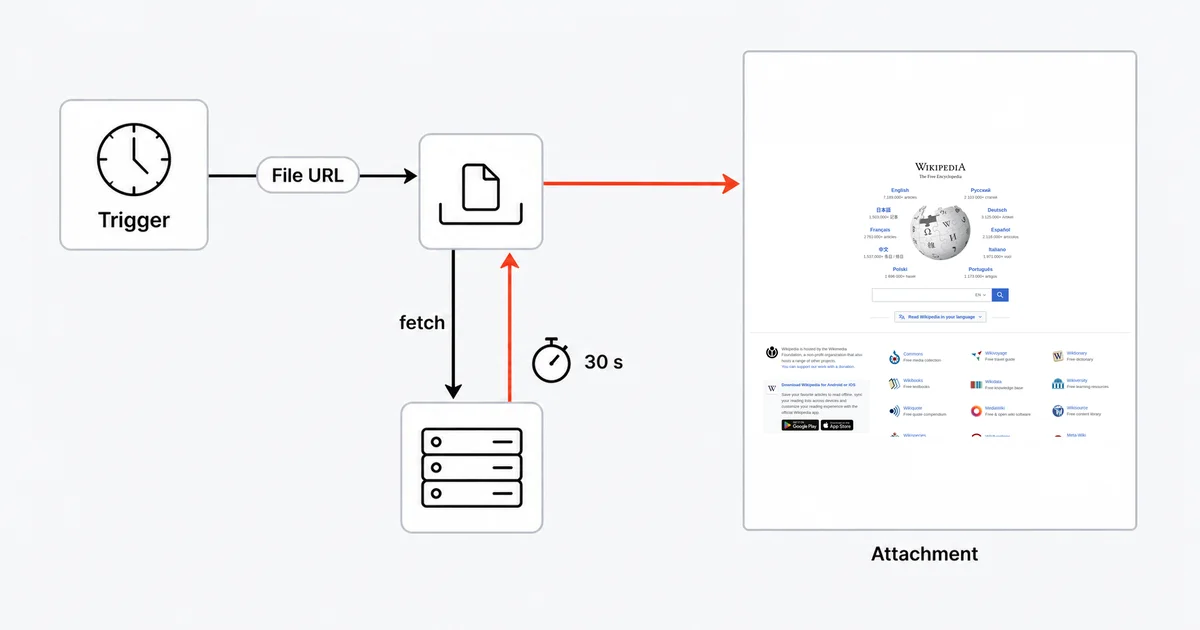
The short answer
Do not use Webhooks by Zapier to fetch the screenshot. Assemble the API URL, drop it into the destination app's file field — Google Drive's File, Gmail's Attachments — and let Zapier do the retrieval. Then watch two things: Zapier gives that retrieval 30 seconds, and the URL carries your API key in plaintext inside the Zap.
Don't fetch the image
It is worth being precise about why the obvious approach disappoints.
Zapier does not document any route from a binary HTTP response body to a file object. Webhooks by Zapier is built around parsed payloads — its GET, POST and PUT actions "include automatic data parsing" — and Zapier warns generally that "not all apps can send back data in a way that Zapier can interpret in subsequent steps." An image/png body is exactly the case its documentation never covers.
Base64 does not rescue it either. Code by Zapier returns "a single output variable, which is an object or array of objects" — there is no documented file output — and its runtime has "an I/O limit of 6 MB" covering code and data together.
The supported path is hydration, and it is genuinely simpler: give a file field a URL, and Zapier fetches it at run time.
The Zap, step by step
Step 1 — Trigger. Whatever supplies the URL: a new row, a form submission, or Schedule by Zapier for a recurring capture. The schedule trigger is free — "Using this tool does not count towards your task usage."
Step 2 — Build the screenshot URL. Often no step at all: type it directly into the next step's file field with the trigger's variables mapped in.
https://api.site-shot.com/?url={{page}}&userkey=YOUR_KEY&full_size=1&no_ads=1&no_cookie_popup=1
Encode the target URL before mapping it into {{page}}, especially if it contains &, # or its own query string. no_ads and no_cookie_popup help remove ads and supported consent overlays; they do not guarantee a faster render.
Step 3 — Destination. Google Drive → Upload File, and paste that URL into the File field. Or Gmail → Send Email with the URL in Attachments. Zapier downloads and attaches it.
That is the whole Zap. Two steps and no webhook.
If you do want the URL assembled in a step of its own — to add a timestamp to the filename, say — Formatter or a Code step producing the string is fine. What you are producing is text, not a file.
The 30-second wall
This is the constraint that decides whether your Zap is reliable, and it is worth reading twice.
Zapier's file documentation states: "Zapier must be able to upload or retrieve the file within 30 seconds or the file request will time out." Separately, its platform documentation gives each step the same budget — "the action/search's perform method must finish processing in 30 seconds."
A screenshot API renders the page before it returns anything, and even a nearly empty page is usually closer to ten seconds than to two. For a heavy one — video backgrounds, a dozen third-party scripts, lazy-loaded images all the way down — a cold full-page render can take longer than Zapier is prepared to wait, and the failure arrives as a timeout on the file field, which does not look like a screenshot problem at all.
What actually helps, in order:
- Capture the viewport, not the whole page. Drop
full_sizeand passwidthandheight. This is the single biggest cut in render time. no_ads=1andno_cookie_popup=1, as above — less to render, less to wait for.max_heightto bound a full-page capture rather than letting it run to twenty thousand pixels.format=jpegon photo-heavy pages, which is smaller to transfer once rendered.
If a specific site simply cannot be captured inside 30 seconds, Zapier is the wrong tool for that one — capture it elsewhere and give Zapier the resulting stored file.
Where your API key ends up
Be clear about this, because the convenient pattern is also the leaky one.
The URL you paste into the file field contains userkey=YOUR_KEY, and it sits in the Zap as ordinary text. Zapier's own guidance about the webhook route says the quiet part out loud: "Credentials are stored in plaintext step fields that anyone with access to the Zap can read, so API by Zapier is more secure for authenticated requests."
For a personal Zap that is usually acceptable — it is your account and the key can be reset. On a shared team account, assume that anyone who can open the Zap can read the key, and rotate it when someone leaves.
API by Zapier is the more careful route for authenticated calls: its API Request action stores credentials in a connection rather than in the step. Note two things before reaching for it — it is a premium app, so "Premium apps on Zapier are only available to users on a paid Zapier plan or while on a free trial", and it does not change the file story: a URL you hand to a file field is still a plain URL.
Four silent failure modes
Webhook redirects can fail. Zapier's webhook troubleshooting guide warns that 301 and 302 redirects are not supported for delivering or retrieving webhook payloads. That warning concerns webhook steps; it does not establish the redirect behavior of every app's file field.
Comma-separated URLs become a ZIP. "If you have multiple file objects or URLs, you can separate them with a comma and a space to send them all at once. This will compress them into a single .ZIP file for uploading." Batching three screenshots into one field gets you one zip, not three images.
Or they vanish entirely. In list-type attachment fields, "Zapier will only send the first in each field. Additional files are silently ignored." Silently.
A blank Data section leaks the previous step. If you do use a webhook action for something: "If you leave the Data section blank, all fields from the previous step will be sent as the Request Payload." And Zapier asks you to keep parameters out of the URL box — "It's recommended not to add URL parameters in this field. Instead, enter URL parameters in the Data fields."
One more worth knowing if a webhook step is in your Zap at all: "If the webhook response data is an array of objects, that will run the subsequent steps in your Zap multiple times — once for each object in the array." That multiplies your task consumption without any error to notice.
Capturing from another country
Add a two-letter ISO 3166-1 country code to the URL and the render routes through a real IP address in that country, with the language, time zone and geolocation defaults that belong to it:
https://api.site-shot.com/?url={{page}}&userkey=YOUR_KEY&country=DE&strict_country=1&no_ads=1
Use the two-letter ISO 3166-1 code, such as country=DE, rather than a country name.
strict_country=1 deserves a moment's thought here specifically. Without it, an exhausted country pool falls back to a US render and Zapier cheerfully files a normal-looking screenshot of the wrong country. With it, the URL returns HTTP 404 instead of your screenshot — the file field fails, the Zap errors, and you find out. Worth knowing the exact shape: that 404 can still carry a PNG error card in its body, so the status is the signal and the bytes are not. That is the behaviour you want, and it has a pleasant side effect: "All action steps that error or halt" do not count as tasks.
Geotargeting comes with any paid plan. The current country list is on the countries page and moves with live proxy capacity.
Where the honest limits are
The two-step version can fit Zapier Free. Zapier's Free plan allows one trigger and one action, with 100 tasks a month as of September 2026. The URL-in-file-field route above does not require Webhooks or API by Zapier. A premium destination app or additional action steps can require a paid Zapier plan; Site-Shot API usage still requires a paid plan.
Schedules are approximate. "Zapier does not guarantee your Zap will trigger at the precise minute you set. It should run within a few minutes of your scheduled time." Fine for a daily capture, not for anything that has to land on the hour.
Files that are too big fail obscurely. "If a file exceeds these limits, your Zap may fail with errors such as 'ENOSPC: no space left on device' or a 400 Bad Request, rather than a clear file size message." If a Zap breaks on exactly one long page, suspect size before suspecting the API.
You may not need Zapier for this. If the entire job is "capture this URL on a schedule and keep the history", scheduled screenshots do it natively — every capture filed in a dated library, with optional email alerts when the page changes by more than a threshold you set. No Zapier tasks or file-fetch timeout; a paid Site-Shot subscription is still required. Zapier earns its place when the screenshot is one step in a longer chain, into a CRM, a client report or a Slack channel.
Pages behind a login will not capture. The API renders public URLs.
The free browser tool has no API. site-shot.com captures any public page with no signup — the quickest way to see both what your target looks like and roughly how long it takes to render, which is exactly what the 30-second question turns on. It is a browser tool, not a free API tier; the API needs a key, and plans start at $5/mo for 2,000 screenshots.
FAQ
How do I take a website screenshot in Zapier? Do not fetch the image with a webhook step. Build the screenshot API URL and put that URL directly into the destination app's file field, such as Google Drive's File field or Gmail's Attachments field. Zapier's documentation states that if you enter a URL, Zapier will try to load the data available at that address and upload it as a file, so Zapier performs the retrieval for you.
Why can't Webhooks by Zapier give me the screenshot image? Because Zapier's webhook actions are built around parsed payloads and it does not document any route from a binary image response body to a file object — Zapier notes that not all apps can send back data in a way that Zapier can interpret in subsequent steps. Base64 is not an alternative either, since Code by Zapier returns an object rather than a file and its runtime has a 6 MB input and output limit.
Why does my Zapier screenshot step time out? Because Zapier must be able to upload or retrieve the file within 30 seconds or the file request will time out, and a screenshot API renders the page before it responds. Capture the viewport instead of the full page, remove ads and cookie banners, and cap the capture height so the render finishes inside the window.
Is my API key safe in a Zapier screenshot URL? No — it is plaintext. Zapier warns that credentials stored in step fields can be read by anyone with access to the Zap, and a key inside a URL you paste into a file field is stored the same way. Treat it as readable by everyone on the account and rotate it when team access changes.
Can Zapier take a screenshot from a specific country? Yes. Add a two-letter ISO 3166-1 country code such as DE to the screenshot URL to route the render through a real IP address in that country, and add strict_country so that an exhausted country pool returns an error rather than silently falling back to a United States render. The file field then fails visibly instead of storing a screenshot of the wrong country.
The free Site-Shot browser tool captures any public page with no signup — try your target URL first to see how long it takes to render. For the API, plans and pricing start at $5/mo for 2,000 screenshots.