Ask Lovable to add screenshots to your app and it will try. Whether it produces something that works depends almost entirely on how much you told it up front — because Lovable makes an architectural decision on your behalf, and you want it to make the right one.
Its documentation describes the behaviour plainly: "When you ask Lovable to integrate an API, it automatically chooses the correct approach," and "If the API requires authentication, Lovable prompts you to enable the built-in backend (Cloud) and add a secret, and automatically creates an Edge Function to protect sensitive credentials."
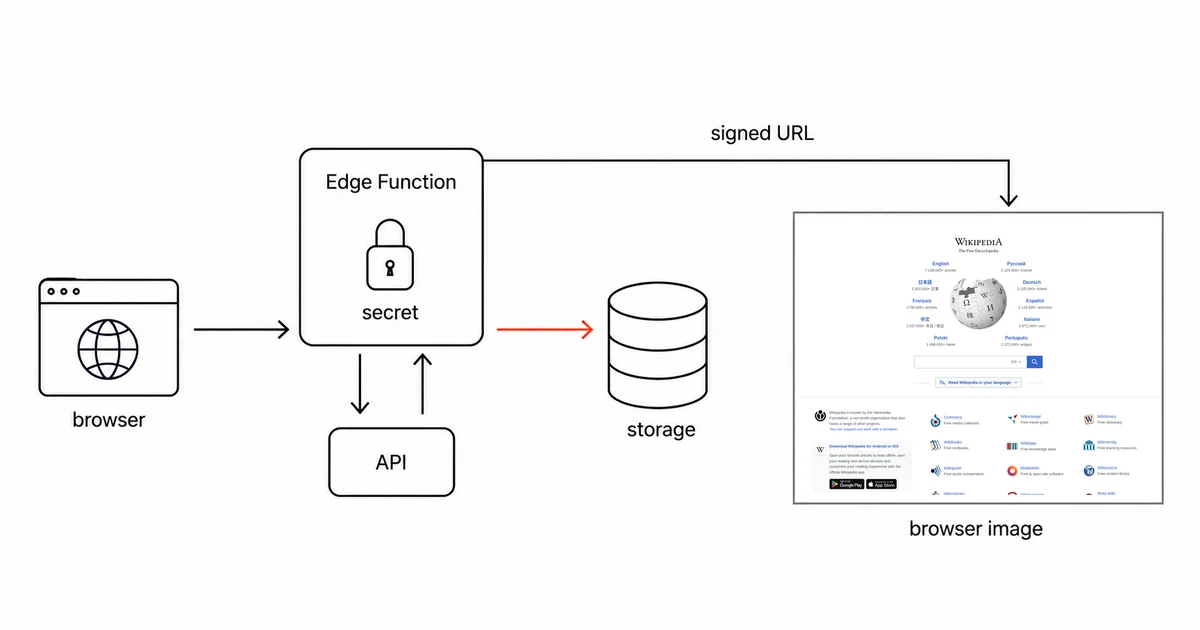
That last clause is the whole game. You want the Edge Function. Check that the generated call runs there, rather than in a browser-side fetch that exposes the key.
The prompt
Lovable's own guidance is to give it the endpoint, the auth method, the headers, and request and response examples. So:
Add a screenshot feature. When the user submits a URL, capture a full-page screenshot of it and display the image in the app.
Use the Site-Shot API. It is a GET request to
https://api.site-shot.com/with query parameters:url(the page to capture),userkey(the API key),full_size=1,no_ads=1,no_cookie_popup=1. It responds with the raw PNG image bytes andContent-Type: image/png.The API key is secret and must never reach the browser. Put the call in an Edge Function and store the key as a secret named
SITESHOT_API_KEY.In the Edge Function, check the response status before reading the body — a failed capture comes back non-2xx and its body can still be a valid PNG error card, so the status is the only reliable signal. On success, read the response with
arrayBuffer(), upload it to Cloud Storage withcontentType: 'image/png', create a signed URL, and return JSON of the form{ "url": "..." }. The frontend should render that URL in an<img>tag.Handle CORS preflight requests in the Edge Function.
That is longer than most people's prompt, and every clause in it is preventing a specific failure below.
Why the API call belongs on the server
CORS is what people reach for first here, and with Site-Shot it is the wrong explanation — which is worth spelling out, because a confidently wrong version of it circulates.
The story goes: the app showed a placeholder instead of a real screenshot; the author published the page to a public link; screenshots started working. Conclusion drawn — publishing fixes CORS.
It does not, and with this API there was no CORS error to fix. Measured, a successful capture returns Access-Control-Allow-Origin: *, including when the request carries a preview--myapp.lovable.app origin — so there is no allow-list to be moved into or out of, and a plain GET carrying only query parameters is a simple request that is never preflighted. Whatever the placeholder was, publishing did not fix it by changing CORS.
The real reason to call the API from an Edge Function is the one Lovable's docs give: it is the only way to keep the key out of the browser. A browser-side fetch ships your API key to every visitor, and that is reason enough on its own.
You do still need CORS handling on your own function, because the browser calls that: "To invoke edge functions from the browser, you need to handle CORS Preflight requests."
Return JSON, not bytes
Here is the part where I am going to be explicit about what I do not know, because it matters.
The important detail is how the frontend client parses the function's response.
One layer down, the function is a Supabase Edge Function and the frontend reaches it through supabase.functions.invoke, whose reference states the parsing rule:
"Responses are automatically parsed as json, blob and form-data depending on the Content-Type header sent by your function. Responses are parsed as text by default."
So returning PNG bytes without a matching Content-Type gets you a mangled string and a broken <img> with no error. Whether returning them with Content-Type: image/png reliably routes to the blob branch is not documented, and I have not tested it. I am not going to assert it either way.
Which is why the prompt above takes the unambiguous route: the function reads arrayBuffer(), uploads to Storage, and returns plain JSON containing a URL. JSON parsing is the one path the documentation describes without ambiguity, and the frontend gets an ordinary image URL.
Ask the API for the size you want
Do not assume a standard Node image-processing library will run in an Edge Function. Supabase's runtime limits exclude libraries that require multithreading, including libvips and sharp.
Request the dimensions you need at capture time. That keeps this integration independent of a separate image-processing library.
Two ways your saved screenshots go dead
Signed URLs expire. Lovable's Storage Copy URL action produces a private-bucket link valid for one hour; that is not a universal lifetime for every signed URL your app generates. An app that stores that URL in a database and renders it tomorrow shows broken images. Store the path and mint a fresh signed URL on each read.
The obvious workaround is off by default. "Public storage buckets are blocked by default on all plans." A workspace owner or admin has to disable that block in Privacy & security before you can use a public bucket — which is a deliberate decision to make, not a checkbox to click past, since it makes every object in that bucket world-readable.
Check project availability before scheduling captures
If you build anything that captures on a schedule, know this one before you rely on it.
"Edge functions are unavailable while a project is paused, so features that depend on them stop working until you resume the project." And traffic does not wake it: a paused Cloud project "only resumes when you explicitly click Wake up on the paused project card."
A paused project cannot run this capture flow. Lovable does support scheduled jobs, so check the project's activity, credit balance and job run history before relying on unattended captures.
Honest limits
The key is safe only if it stays in the Edge Function. The entire security benefit rests on that. If a later prompt causes Lovable to move the call into the frontend "to make it faster," the key ships to every visitor. Check where the fetch actually lives after any significant regeneration.
This is a prompt, and prompts drift. Unlike a code snippet you paste, what Lovable generates from the prompt above will vary. Read the Edge Function it writes before you trust it — particularly where the key is read from, and whether the response is JSON.
Nothing here is monitoring. A button that captures a page on demand is a feature. Being told when a page changes is a different product.
FAQ
Why does my Lovable app show a broken image instead of a screenshot?
One possible cause is an Edge Function returning raw image bytes without a matching Content-Type header. The invoke client parses responses as text by default, so the frontend receives a mangled string rather than an image, with no error raised. Returning JSON containing a storage URL avoids the ambiguity entirely.
Does publishing a Lovable app fix CORS errors when calling an API?
No — and with Site-Shot there is nothing for it to fix. Measured, every successful capture returns Access-Control-Allow-Origin set to a wildcard, so a browser call is not blocked from a preview URL or a published one. If screenshots started working after you published, CORS was not the cause. Call the API from an Edge Function anyway, because that is what keeps your API key out of the browser.
Can I resize or thumbnail a screenshot inside a Lovable Edge Function?
Do not assume libraries such as libvips or sharp will work: Edge Functions do not support Node libraries that require multithreading. This guide avoids that dependency by requesting the dimensions from the screenshot API at capture time.
Why do my saved screenshots stop loading after a while?
Private storage bucket links are temporary signed URLs. Links made with Lovable's Storage Copy URL action expire after one hour; an app-generated link has the lifetime set when it is created. Store the object path rather than the signed URL and generate a fresh one when rendering. Public buckets are an alternative but are blocked by default on all plans and must be enabled by a workspace owner or admin.
Will a scheduled screenshot feature keep running in Lovable?
Lovable supports scheduled jobs, but this Edge Function flow stops while its Cloud project is paused. Incoming traffic does not resume a paused project. Check project availability, credits and job run history before relying on unattended capture.
Related reading
- How to Take Website Screenshots in Bubble — the other app builder, where one dropdown decides the whole integration.
- How to Take Website Screenshots in Cloudflare Workers — the same key-hiding proxy, written by hand.
- How to Take Website Screenshots in Retool — internal tools rather than customer-facing apps.
- Screenshot API documentation — every parameter used above.
Site-Shot answers a plain GET with a PNG, which keeps the Edge Function short enough to read in one screen and verify that your key never leaves it. See the plans.