Return raw image bytes from an AutoGen screenshot tool and the call can appear to work even though the model never receives an image. A fluent reply is not proof that the model saw the page.
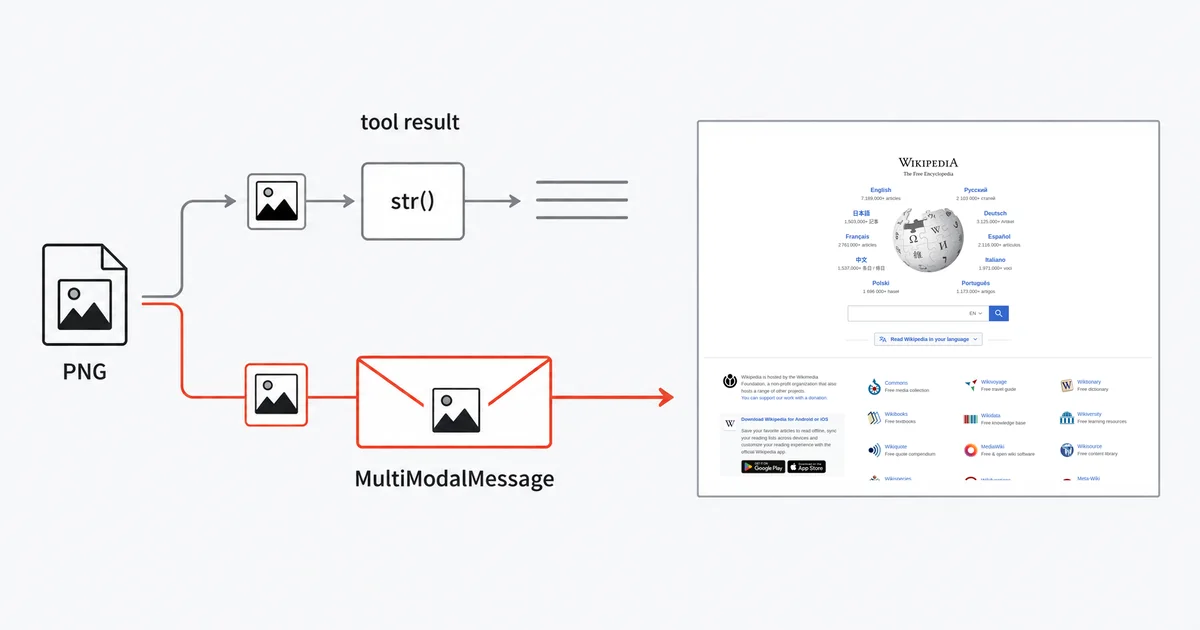
The cause is one line. BaseTool.return_value_as_string ends with return str(value), and the object that carries a result back to the model, FunctionExecutionResult, declares content: str as a required field.
So your PNG becomes b'\x89PNG\r\n\x1a\n...' — the Python repr of the bytes, as text, billed as tokens. The conversion itself need not raise an error. The model receives text rather than pixels, so it cannot visually inspect the page.
First, which AutoGen?
Several related packages use the AutoGen name, and advice for one may not apply to the others:
autogen-agentchat/autogen-core/autogen-ext— Microsoft's current line,microsoft/autogen. This post is about these.ag2— the community fork.autogen— AG2 Classic, a different package from the above despite the name.
One more thing you should know before investing: the microsoft/autogen README carries a caution that "AutoGen is now in maintenance mode. It will not receive new features or enhancements and is community managed going forward," and directs new users to Microsoft Agent Framework.
That is a reason to read this as a mechanism rather than a tutorial. The failure below is a design consequence of typing tool results as strings, and the same reasoning transfers to the frameworks people are migrating toward.
The escape hatch that also fails
AutoGen does have an image-shaped result type. autogen_core.tools defines ImageResultContent — "Image result content of a tool execution" — and McpWorkbench populates it from MCP ImageContent.
So an MCP screenshot server hands AutoGen a genuine image object. Then AssistantAgent flattens it:
FunctionExecutionResult(
    content=tool_result.to_text(),
    name=...,
    call_id=...,
)
and ToolResult.to_text renders an image as f"[Image: {content.content.to_base64()}]".
Your image becomes a base64 blob embedded in a string. Better than a byte repr, still not an image — the model sees text either way, and the encoded data consumes text tokens.
An MCP server returning image content is not enough: the client must preserve that content when it calls the model.
Three more dead ends, briefly
HttpTool cannot carry an image. It is the obvious answer for "call an HTTP endpoint," and its return_type is Literal["text", "json"]; the GET branch does return response.text. httpx will mojibake a PNG body into a str. Its default timeout is also 5.0 seconds, which a large full-page render can exceed.
Image.from_uri() does not accept a URL. Despite the name, it regex-matches data:image/(?:png|jpeg);base64, and otherwise raises ValueError("Invalid URI format. It should be a base64 encoded image URI."). If your screenshot API returns a hosted URL, this is the method you will reach for and it will reject it.
An AssistantAgent cannot emit an image to a peer. its standard output message types do not include MultiModalMessage. So even with a working image in hand, an AssistantAgent inside a team structurally cannot pass a screenshot to another agent.
The route that works
Stop trying to return the image from a tool. Fetch it yourself, and put it into the conversation as a message. This snippet assumes an existing vision-capable agent and runs in an async function or notebook:
import io
import os
import httpx
from PIL import Image as PILImage
from autogen_core import Image as AGImage
from autogen_agentchat.messages import MultiModalMessage


def capture(page_url: str) -> AGImage:
    """Fetch a full-page screenshot and wrap it as an AutoGen Image."""
    r = httpx.get(
        "https://api.site-shot.com/",
        params={
            "url": page_url,
            "userkey": os.environ["SITESHOT_API_KEY"],
            "full_size": 1,
            "no_ads": 1,
            "no_cookie_popup": 1,
        },
        timeout=60.0,
    )
    r.raise_for_status()
    return AGImage(PILImage.open(io.BytesIO(r.content)))


shot = capture("https://example.com")

result = await agent.run(
    task=MultiModalMessage(
        content=["Does this pricing page show a free tier above the fold?", shot],
        source="user",
    )
)
The pipeline is bytes → BytesIO → PIL → autogen_core.Image → MultiModalMessage. A MultiModalMessage accepts a list mixing strings and images, so this path delivers the image to a vision-capable model.
The cost of this design is real and worth stating: the agent cannot decide to take a screenshot. You decide, before the turn. If you need the model to choose, have a tool return a URL string and capture it yourself on the next turn based on what the tool reported.
If you need an agent that can emit images
AutoGen's own MultimodalWebSurfer solves the produced_message_types problem the only way available: it is a custom BaseChatAgent that declares return (MultiModalMessage,).
That is the supported pattern for a screenshot-producing agent inside a team — subclass BaseChatAgent and declare the message type. It is more work than a tool, and it is the architectural fact the framework's design forces on you.
Honest limits
This is maintenance-mode software. Microsoft directs new projects to Agent Framework. Maintenance mode does not freeze dependencies or documentation: pin the versions you test and recheck integrations when upgrading.
Keep the key out of the function signature. Any parameter on a tool becomes part of the schema handed to the model. Read the key from the environment inside the function body, as above.
Set your own timeout. The example passes timeout=60.0 to httpx deliberately. Do not inherit a 5-second default from anything.
Nothing here makes AutoGen a monitoring tool. Handing a model one screenshot to reason about is a different job from watching a page over time.
FAQ
Why does my AutoGen agent describe a screenshot it never received?
AutoGen's standard tool-result path converts return values to strings. Returning raw image bytes therefore puts the Python repr of the PNG into the context as text, not as an image. The conversion need not raise an error, so a completed run does not establish that the model saw the screenshot.
Does returning an image result type from an MCP server fix it?
Not in the standard AssistantAgent path described here. AutoGen has an image result content type and MCP servers can populate it, but AssistantAgent flattens the result to text, rendering the image as base64 inside a string. The model receives text rather than image input.
Can I use HttpTool to call a screenshot API?
Not to retrieve image bytes for a vision model. Its return type is limited to text or json and the GET branch returns response text, which is unsuitable for a PNG body. Its default timeout is five seconds, which a large full-page render can exceed.
Why does Image.from_uri reject my screenshot URL?
Because despite the name it does not accept http or https URLs. It matches only base64 data URIs for PNG and JPEG, and raises a value error saying the URI should be a base64 encoded image URI for anything else.
How do I actually get a screenshot in front of an AutoGen model?
Fetch it outside the tool call and pass it in a MultiModalMessage, whose content accepts a list mixing text and images. Wrap the bytes with PIL and the autogen_core Image class. Note that this means you decide when to capture, not the agent, because an AssistantAgent cannot produce a MultiModalMessage.
Related reading
- How to Give a CrewAI Agent Website Screenshots — the other framework where a tool cannot return an image.
- How to Give a LlamaIndex Agent Website Screenshots — how to return images as content blocks.
- How to Give a LangChain Agent Website Screenshots — where it works, but only on some providers.
- Screenshot API documentation — every parameter used above.
Site-Shot returns PNG bytes from one GET, so the capture function above needs no local browser — which matters more when the framework is already making you do the plumbing by hand. See the plans.