The llama-index-tools-playwright tool spec exposes navigation, clicks, form entry and extraction, but no screenshot function. To capture a public URL for a vision model, you can define a small tool of your own.
The important detail is the return type: a LlamaIndex tool can return an ImageBlock. Returning the bytes alone takes a different path and turns them into text.
This post is that mechanism, and the two ways it silently does nothing.
The tool
Requires llama-index-core 0.12.45 or later — the release whose changelog line reads "feat: allow tools to output content blocks."
import os
import httpx
from llama_index.core.llms import ImageBlock


def screenshot(url: str) -> ImageBlock:
    """Take a full-page screenshot of a public web page and return the image.

    Use this when you need to see how a page actually renders — layout,
    visual bugs, whether a banner is covering something — rather than
    reading its text.
    """
    r = httpx.get(
        "https://api.site-shot.com/",
        params={
            "url": url,
            "userkey": os.environ["SITESHOT_API_KEY"],
            "full_size": 1,
            "no_ads": 1,
            "no_cookie_popup": 1,
        },
        timeout=60.0,
    )
    r.raise_for_status()
    return ImageBlock(image=r.content, image_mimetype="image/png")
Wire it to an agent:
from llama_index.core.agent.workflow import FunctionAgent
from llama_index.llms.anthropic import Anthropic

agent = FunctionAgent(
    tools=[screenshot],
    llm=Anthropic(model="claude-opus-5"),
    system_prompt="You can look at web pages. Use the screenshot tool when the question is visual.",
)

response = await agent.run("Does the pricing page on example.com show a free tier above the fold?")
FunctionAgent, not ReActAgent. That is not a style preference — see below.
Why the content block matters
FunctionTool.call() runs its result through _parse_tool_output, which begins by checking whether the returned object is already a content block:
if isinstance(raw_output, (TextBlock, ImageBlock, AudioBlock, ...)):
    return [raw_output]
Anything that is not one of those falls through to return [TextBlock(text=str(raw_output))]. Those blocks land on ToolOutput.blocks, and FunctionAgent forwards them into the conversation verbatim as a tool-role message.
Raw bytes are accepted and base64-encoded for you, so there is no manual encoding step. A hosted URL works too, but is not required.
Returning bytes is the failure that costs you money
This follows directly from the fall-through above, and it is worth stating on its own because nothing raises.
return r.content # DON'T
str(b"\x89PNG\r\n\x1a\n...") is a perfectly valid string. The agent sends the literal Python repr of your PNG to the model as text — potentially thousands of unnecessary text tokens, without giving the model an image to inspect.
No exception. No warning. Wrap it in ImageBlock.
The provider split
Here is the part that will waste your afternoon: the same correct code behaves differently depending on which model you point it at.
Anthropic forwards the image. The Anthropic integration builds its tool result from all blocks, so an ImageBlock reaches the model.
The OpenAI Chat Completions path discards it. The integration carries this note in its source:
"NOTE: Despite what the openai docs say, if the role is ASSISTANT, SYSTEM or TOOL, 'content' cannot be a list and must be string instead."
The Chat Completions tool-role branch is built from text blocks only. The Responses path is different: the current integration source preserves image and file parts in function-call outputs. Check the installed integration version rather than treating this as a limitation of every OpenAI endpoint.
For OpenAI, use an integration version and endpoint that preserve image tool outputs. If you specifically need Chat Completions, attach the image as a user message rather than as tool-role content.
This comparison covers the OpenAI and Anthropic integrations. Other providers may handle tool-returned images differently; test the exact provider and version you deploy.
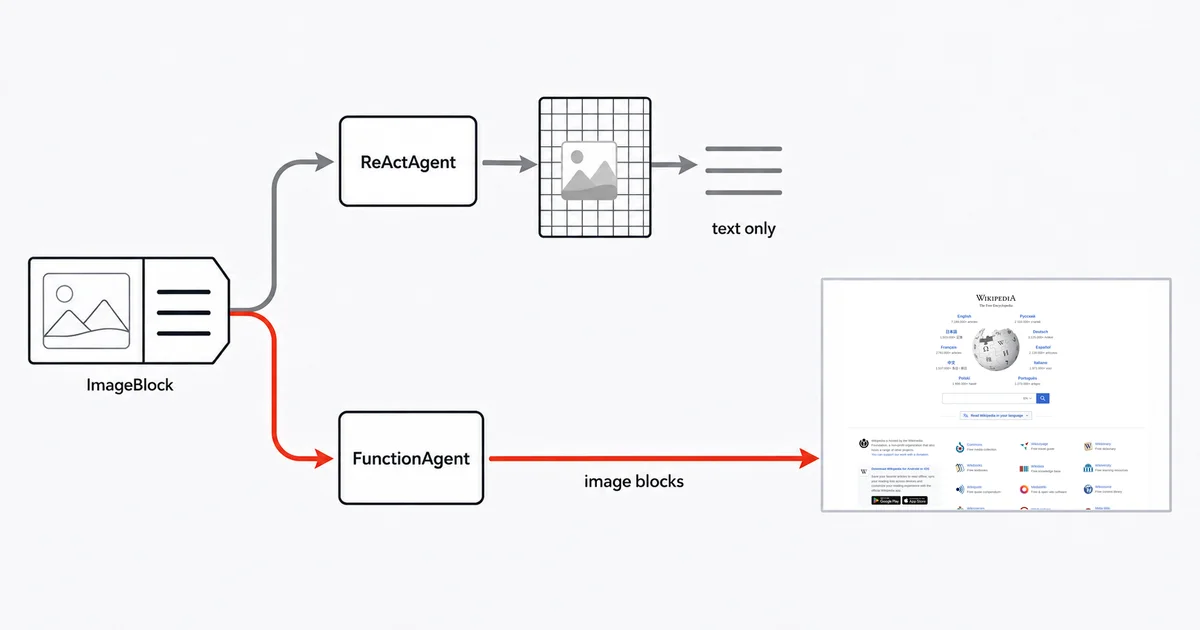
ReActAgent drops images on every provider
Separately from the provider question, the agent class matters.
ReActAgent records each tool result as ObservationReasoningStep(observation=str(tool_call_result.tool_output.content)), and ToolOutput.content is defined as the text blocks joined together — image blocks are filtered out before the model ever sees them.
So a correct tool, on a provider that supports images, still returns nothing visible if you run it under ReActAgent. Use FunctionAgent for any image-returning tool.
Three smaller traps
The built-in HTTP tool cannot fetch an image. RequestsToolSpec.get_request ends in return res.json(), which raises on a PNG body. Every method in that spec does the same. Do not reach for llama-index-tools-requests here.
Always pass image_mimetype explicitly. ImageBlock guesses the MIME type from a file extension, and a screenshot API URL does not have one. On the Anthropic path a missing MIME type is a hard ValueError. (Passing raw bytes, as above, is the safe route — the content gets sniffed — but naming it costs nothing.)
Never put the key in the function signature. Every parameter becomes part of the JSON schema sent to the model, so a userkey: str argument invites the model to echo or invent it, and puts it into agent memory and traces. Read it from the environment inside the body, and keep the signature def screenshot(url: str).
Honest limits
LlamaIndex imposes no size limit on an image, and that is not reassuring. There is no documented cap beyond a zero-byte check; the real ceiling is whatever the downstream model accepts. A full-page screenshot of a long page is a large base64 payload.
Agents run up to 20 iterations per run() by default, with no timeout. Base workflows default to 45 seconds, but agents explicitly override that to None. Set an HTTP timeout separately, as the example does with timeout=60.0, rather than relying on the agent's overall run limit.
Whether images are re-sent on every turn is unknown. I could not establish whether FunctionAgent memory replays a returned ImageBlock on each subsequent LLM call or serialises it away. For a screenshot workflow that is a real cost question. If you are running long conversations, measure your token usage rather than trusting either answer.
The multi-modal docs page is stale. It still teaches the deprecated MultiModal LLM classes, which were folded into the base LLM classes in 0.12.47. Prefer the changelog and the source over that page.
FAQ
Can a LlamaIndex tool return an image?
Yes, since llama-index-core 0.12.45. Return an ImageBlock from the tool function and the framework passes it through as a content block on the tool output. ImageBlock accepts raw bytes and base64-encodes them for you; the agent and provider integration must also preserve image blocks.
Why does my agent say it cannot see the screenshot?
Check both the agent class and the provider integration. The OpenAI Chat Completions path uses text-only tool content, while current Responses integration code preserves image parts. ReActAgent also reduces tool results to text. Use FunctionAgent and verify the exact provider and package version.
What happens if a tool returns raw image bytes?
The output becomes a text block containing the string representation of the bytes, so the model receives the Python repr of the PNG rather than image input. The conversion need not raise an error and can consume many text tokens. Wrap the bytes in an ImageBlock.
Does the Playwright tool in LlamaIndex take screenshots?
The reviewed Playwright tool spec exposes click, fill, get_current_page, extract_hyperlinks, extract_text, get_elements, navigate_to and navigate_back, but no screenshot function. The custom tool above provides that function for public URLs.
Where should the screenshot API key live?
In an environment variable, read inside the tool function body. Never make it a function parameter, because every parameter becomes part of the JSON schema sent to the model, which invites the model to echo or invent the value and persists it into agent memory and traces.
Related reading
- How to Give a LangChain Agent Website Screenshots — the same provider split, in a framework that documents its version of it.
- How to Give a CrewAI Agent Website Screenshots — using file attachments and multimodal image tools.
- AI Agent vs Screenshot API — when to render in the agent's own browser instead.
- Screenshot API documentation — every parameter used above.
Site-Shot returns PNG bytes from one GET, which is exactly what ImageBlock wants — no hosting step, no base64 handling, no browser for your agent to drive. See the plans.