Your agent can read a page's HTML. It still cannot see the page. Rendered layout, the chart in the hero image, the cookie wall covering the offer, the ad that only loads in Germany — none of that survives a text scrape, and all of it is what someone means when they ask an agent "does this page look right?"
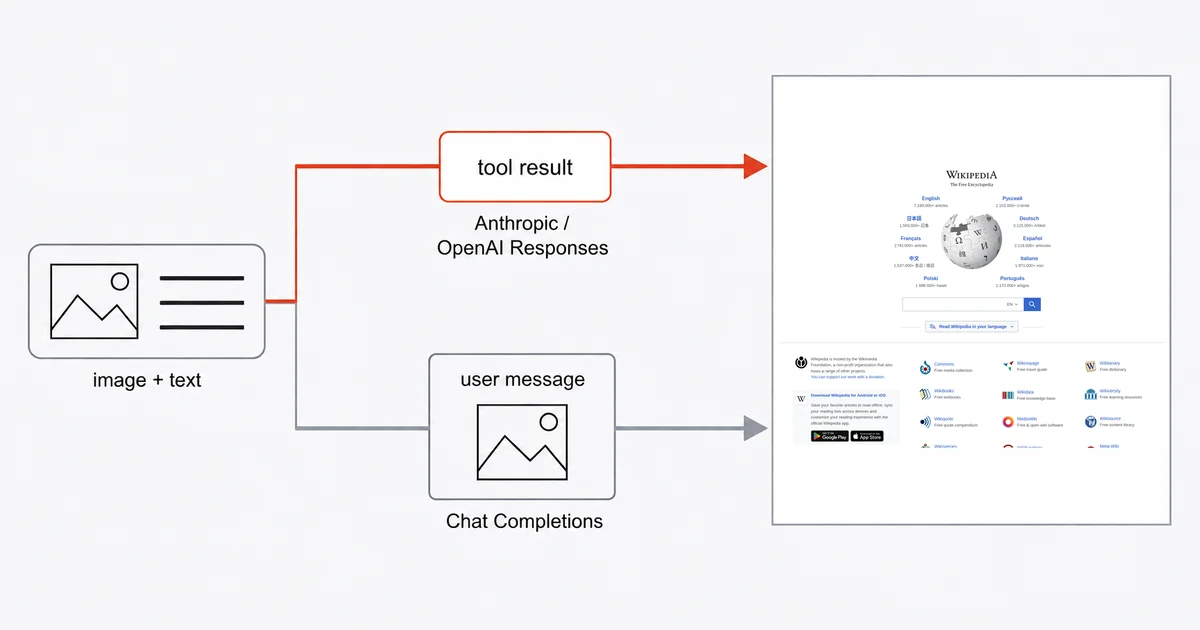
The fix is a tool that returns a picture. LangChain's own tools documentation uses exactly this as its canonical example of a tool returning multimodal content — a function literally named capture_screenshot. What the docs show is the easy half. The half that will cost you an afternoon is that the documented example returns a URL, most screenshot APIs return bytes, and whether the image reaches the model at all depends on which provider you are pointed at.
This is the working version, with the parts that break called out.
The short answer
Define a @tool that calls a screenshot API and returns a list of content blocks — one text block naming what the picture is, one image block carrying base64. Claude supports images in tool results. OpenAI support depends on the endpoint and integration version: current Responses integrations support image outputs, while Chat Completions tool messages do not. Budget for images retained in conversation history, and treat screenshot content as untrusted input.
The tool, in full
Install LangChain, its Anthropic integration and the Site-Shot Python SDK. The Site-Shot SDK itself uses only the standard library:
pip install langchain langchain-anthropic site-shot
The tool wraps one capture call:
from langchain.tools import tool
from site_shot import SiteShot

client = SiteShot()  # reads SITESHOT_API_KEY from the environment


@tool
def capture_screenshot(url: str) -> list[dict]:
    """Capture a full-page screenshot of a public web page and return the image.

    Use this when the answer depends on how the page looks rather than what its
    HTML says: layout, rendered charts, images, banners, or visual regressions.
    Takes a single public URL. Does not work on pages behind a login.
    """
    png = client.capture_base64(
        url, full_size=True, no_ads=True, no_cookie_popup=True
    )
    return [
        {"type": "text", "text": f"Full-page screenshot of {url}:"},
        {"type": "image", "base64": png, "mime_type": "image/png"},
    ]
Three details matter here.
The type hints are not decoration. LangChain's docs are explicit: "Type hints are required as they define the tool's input schema." Drop the url: str annotation and the tool will not build.
The docstring is the tool description the model actually reads when deciding whether to call this instead of fetching HTML. The version above tells it when the tool applies and when it doesn't. A one-line docstring gets you an agent that screenshots things it should have read.
mime_type is mandatory here. LangChain's content-block reference marks it "Required for base64 data". Omit it and you get an unhelpful failure well downstream of the line that caused it.
Create an agent to execute tool calls and pass their results back to the model:
from langchain.agents import create_agent
from langchain.chat_models import init_chat_model

model = init_chat_model("claude-opus-5", model_provider="anthropic")
agent = create_agent(model=model, tools=[capture_screenshot])
result = agent.invoke({
    "messages": [{"role": "user", "content": "Check the layout of https://example.com"}]
})
Why not the URL form the docs show
LangChain's example returns {"type": "image", "url": "https://example.com/page.png"}. That keeps the request payload small by letting the provider fetch the hosted image.
It also assumes the screenshot already lives at a public URL. Site-Shot's API returns the image as the response body, and its JSON mode returns a data URL rather than a hosted link, so there is no URL to hand over. You have two honest options: base64 the bytes into the message, as above, or upload the capture to your own storage first and pass that link.
Base64 avoids a separate storage step. A hosted URL reduces payload size and simplifies reuse, but it does not remove vision-token charges: the provider still processes the image when the conversation includes it. Those charges depend on the model, image dimensions and caching, not the number of characters in the URL.
That last point is not a rounding error, so it gets its own section below.
Check the provider and endpoint
This is the part that turns a working prototype into a broken one when you switch models.
Claude models accept images inside a tool result. Anthropic's tool-use documentation states that a tool_result block's content "can use the text, image, document, or search_result types", and ships a worked example of a tool result carrying a base64 image. The tool above works as written.
OpenAI Chat Completions tool messages do not accept images, but Responses function outputs do. The OpenAI SDK type allows text, image and file outputs, and current LangChain code preserves those parts. Use a compatible langchain-openai version with the Responses endpoint, and test the exact model you select.
For an application that specifically uses Chat Completions, the image belongs in a user message. In a custom tool-execution loop, keep the capture in application state and attach it after recording the corresponding tool result:
captures = {}  # application state for this conversation

@tool
def capture_screenshot(url: str) -> str:
    """Capture a full-page screenshot of a public web page. Returns a reference."""
    captures[url] = client.capture_base64(url, full_size=True, no_ads=True)
    return f"Captured {url}. The screenshot is attached in the next message."
# after executing the tool call, before the next model request:
messages.append({
    "role": "user",
    "content": [
        {"type": "image", "base64": captures[url], "mime_type": "image/png"},
        {"type": "text", "text": "This is the screenshot you requested."},
    ],
})
The second pattern requires your own message-handling loop; it is not a drop-in replacement for the create_agent example above. Prefer native multimodal tool results when your chosen endpoint supports them.
Keeping the context from exploding
Images retained in conversation history can be processed again on later turns. That applies to hosted images as well as base64 attachments; actual billing depends on the provider's image accounting and prompt caching.
A full-page capture of a long marketing page can run into megabytes. Three of those early in a ten-turn conversation is a bill you will notice. Four levers, cheapest first:
no_ads=Trueandno_cookie_popup=True— already in the snippet above. A cookie wall covering the fold is simultaneously a useless image and a full-price one.- Capture the viewport, not the page. Drop
full_sizeand passwidth=1280, height=800when the question is about the top of the page, which it usually is. format="jpeg"for photographic pages. Meaningfully smaller than PNG; a poor choice for screenshots of text and UI, where PNG stays sharper.max_heightto cap a full-page capture that would otherwise run to twenty thousand pixels.
If the agent only needs to check something rather than keep it, drop the image from the history once it has been described. LangChain's own guidance for long-running agents is to prefer references over base64 blocks.
Geotargeting, and failing loudly
Pass a two-letter ISO 3166-1 country code and the render routes through a real IP address in that country, with the language, time zone and geolocation defaults that belong to it:
png = client.capture_base64(
    "https://example.com/", country="DE", strict_country=True, no_ads=True
)
Full country names are not valid values — it is country="DE", never country="Germany".
strict_country is the parameter to care about in an agent. Without it, a country whose proxy pool is momentarily exhausted falls back to a US render and returns a perfectly normal screenshot of the wrong thing. An agent cannot tell that happened. It will describe the US page in confident detail and you will have no signal that anything went wrong. With strict_country=True the call fails instead: the API answers "error": "country_unavailable", and the Python SDK surfaces that as a CountryUnavailableError you can catch. Catch it inside the tool and hand the failure back to the model as text — that is the failure you want, because a silently-wrong geo screenshot is undetectable downstream.
Geotargeting comes with any paid plan. The current country list lives on the countries page and follows live proxy capacity, so it changes.
Treat the screenshot as untrusted input
A screenshot is a picture of a page you do not control, handed to a model that follows instructions.
Anthropic's documentation is direct about this: tool results "often carry content from sources outside your control: web pages, inbound email, user uploads, third-party APIs", and an attacker who can influence that content "may embed instructions that try to redirect Claude". A page can render text sized for the model rather than the reader. The screenshot delivers it faithfully.
Two useful precautions are: Keep the image inside the tool_result block rather than promoting it into a system prompt — the boundary is what lets the model treat it as data. And do not let an agent that captures arbitrary URLs also hold credentials or the ability to send things outward in the same loop; the screenshot is the injection vector and the outbound tool is the payload.
None of this is specific to screenshots. It is specific to any tool that returns content from the open web, which is most of the interesting ones.
Where the honest limits are
Pages behind a login are out of scope. The API captures public URLs. If your agent needs to sign in, step through a flow and then look, that is a browser-driving job, not a screenshot-API job — we wrote about where that line falls.
There is no LangChain integration package. This is a tool you write, as shown above, not a pip install that registers itself. That is a fair trade for most people — the tool is short and you control the docstring, which is the part that decides whether your agent calls it correctly.
The model has to support images at all. LangChain's docs put it plainly: "The model must support the modalities you return. Check your model's capabilities before returning images."
Screenshots are not a text extractor. If you want the words, ask for the rendered HTML — cheaper, exact, and no vision tokens. Screenshots earn their cost when the appearance is the question.
The free browser tool has no API. site-shot.com captures any page with no signup, which is the fastest way to check what a capture of your target actually looks like before you write code. It is a browser tool, not a free API tier; the API needs a key, and plans start at $5/mo for 2,000 screenshots.
FAQ
Can a LangChain tool return an image? Yes. A LangChain tool returns image content by returning a list of content blocks containing an image block — either {"type": "image", "url": ...} for an already-hosted image, or {"type": "image", "base64": ..., "mime_type": "image/png"} for raw bytes, where mime_type is required for base64 data. Whether the model accepts it depends on the provider.
Why does my LangChain screenshot tool fail on OpenAI models but work on Claude? Check the endpoint and integration version. Anthropic supports image blocks in tool results. OpenAI Chat Completions tool messages do not, but Responses function outputs support images and current LangChain code preserves them. Use a compatible Responses integration, or attach the image as a user message when using Chat Completions.
How much context does a screenshot cost an agent? An image kept in conversation history can consume vision tokens again on later requests, whether it is supplied as base64 or a hosted URL. Cost depends on the model, image dimensions and caching. Capture only the area needed and remove the image from history when further visual inspection is unnecessary.
Can a LangChain agent take a screenshot from another country? Yes. Pass a two-letter ISO 3166-1 country code such as country="DE" to route the render through a real IP address in that country, and add strict_country=True so an exhausted country pool raises CountryUnavailableError in your own code instead of silently falling back to a US render. Geotargeting is included with any paid Site-Shot plan.
Is a screenshot from an agent tool a security risk? It can be. A screenshot is content from a page you do not control, delivered to a model that follows instructions, so it is a route for indirect prompt injection. Keep the image inside the tool result rather than a system prompt, and avoid giving one agent both the ability to capture arbitrary URLs and the ability to send data outward.
The free Site-Shot browser tool captures any public page with no signup — try your target URL before you write the tool. For the API, plans and pricing start at $5/mo for 2,000 screenshots.