You can build an Activepieces screenshot flow with the HTTP piece, but a File input often makes it simpler.
Activepieces has a property type — Property.File — that accepts a URL and fetches it for you. The documentation is one sentence: "This property collects a file from the user, either by providing a URL or uploading a file."
So the shortest working flow is a Google Drive "Upload file" step with the screenshot API URL pasted into its File field. No HTTP step. No base64. No conversion.
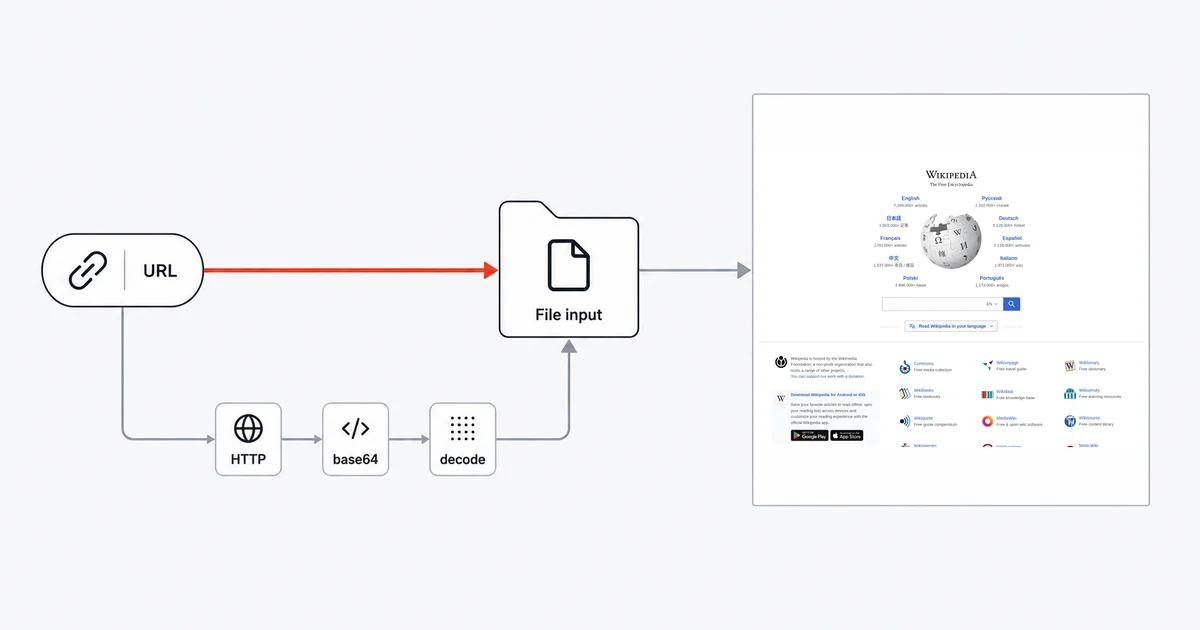
Route A: no HTTP step
Anywhere Activepieces shows you a File input — Google Drive's Upload file, Amazon S3's Upload File, a Gmail attachment, Files Helper's Read File — you can paste a URL and the engine retrieves the bytes.
https://api.site-shot.com/?url={{trigger.page_url}}&userkey={{variables['SITESHOT_KEY']}}&full_size=1&no_ads=1&no_cookie_popup=1
That is the entire integration. One step, one field.
One encoding rule before you paste it: url= is an ordinary query parameter, so an unencoded & inside the target URL ends the value early. Measured, url=https://example.com/?utm_source=news&utm_medium=email reaches the API as https://example.com/?utm_source=news — the rest is swallowed as a separate parameter. If your trigger can supply URLs carrying query strings, encode them first.
The catch is the same one that applies on every URL-in platform: that URL carries your API key, and it is now stored in the flow, visible to anyone who can open it. Which is exactly why the key belongs in a Project Variable rather than typed inline — see below.
Route B: through the HTTP piece, and the two defaults that break it
Sometimes you need the response itself — to branch on it, to rename the file, to do something before storing it. Then you use the HTTP piece, and two unchecked boxes decide whether it works.
Tick "Response is Binary". Without it, the client defaults to responseType ?? 'json', and the JSON branch calls response.text() and attempts a parse. A PNG body becomes a lossily UTF-8-decoded string. It does not throw. You get a green step containing garbage.
Tick "Follow redirects". This one is unchecked by default and is worse, because the failure is invisible. With redirects off, the client sets redirect: 'manual' and raises its success ceiling from 300 to 400. A screenshot API that 302s to a CDN object therefore returns status 302, an empty body, and no error at all. The step goes green with nothing in it.
With both ticked, the step output is { status, headers, body } where body is a base64 string — not a file, not a buffer. To make it a file, add a second step: Files Helper → Create file, Content = {{step_1.body}}, File name = screenshot.png, Encoding = Base64.
The extra Create file step matters: the HTTP response body is still text until it is decoded into a file.
The base64 rule that is exactly inverted between the two steps
Worth its own heading, because getting it backwards produces two different confusing errors.
A File input wants a data URL. The engine's file processor matches ^data:([A-Za-z-+/]+);base64,(.+)$ and nothing else. A bare base64 string falls through to a fetch() on that string, which throws Expected file url or base64 with mimeType. So write:
data:image/png;base64,{{step_1.body}}
Files Helper "Create file" wants the raw base64. Here the data:image/png;base64, prefix is not stripped — it gets decoded as part of the content and corrupts the file. So write:
{{step_1.body}}
Same value, opposite requirement, one step apart. Route A avoids the question entirely, which is the strongest argument for it.
Where the key lives
The HTTP piece's Authentication dropdown offers None, Basic Auth and Bearer Token. There is no query-parameter mode, so a key like userkey= goes into a Project Variable:
"Project Variables are named values, scoped to a single project, that you can reference from any step in any flow."
Create it under Variables in the sidebar, then reference it as {{variables['SITESHOT_KEY']}}.
Project Variables provide several useful safeguards: "A variable's value is encrypted at rest and never displayed in the variables list or the edit dialog." Changing it means Rotate value, and on platforms with audit logs enabled "each reveal is recorded as a VARIABLE_VALUE_REVEALED event." Read and write are separate permissions.
Activepieces also states that in run logs "third-party credentials or any sensitive information are systematically censored."
The size ceiling that ends batch flows
If you loop over a list of URLs, this is what will stop you, and the reason is specific.
Flow runs have a maximum log size — 25 MB on Cloud — and step outputs cannot be trimmed to fit:
"Since outputs cannot be truncated without breaking subsequent steps, the engine has no choice but to fail the run."
A base64 body is about a third larger than the image it encodes, and it counts in full. Ten full-page captures in one run can end as LOG_SIZE_EXCEEDED.
Offloading does not rescue you. Outputs above 32 KB are moved to object storage, but the docs are blunt that this buys nothing: runs exceeding the cap fail "regardless of how many outputs were offloaded to object storage."
The documented fix is Route A: "For large file handling, prefer passing files between steps using the built-in file storage (e.g. via Files / File properties) rather than embedding raw bytes in step outputs."
Honest limits
Saved files cap at 10 MB on Cloud (25 MB self-hosted by default), and the check happens while the bytes stream — "crossing it aborts the transfer and fails the step before anything is uploaded." Full-page captures of long pages exceed this. Bound the height at capture time.
Flow and single-action runs time out at 10 minutes on Cloud. Generous for one screenshot, tight for a large loop.
This guide uses built-in pieces, not a dedicated Site-Shot piece. The File and HTTP routes above do not depend on a vendor-specific catalog integration.
FAQ
Do I need the HTTP piece to take a screenshot in Activepieces?
No, and usually you should not use it. Any File property accepts a URL and the engine fetches the file for you, so pasting the screenshot API URL directly into a Google Drive, S3 or Gmail attachment field is a complete one-step integration with no base64 handling at all.
Why does my HTTP step return garbled text instead of an image?
Because Response is Binary was not ticked. The HTTP client defaults to a JSON response type, which reads the body as text and attempts to parse it, so a PNG comes back as a lossily decoded string. Nothing throws, so the step appears to succeed.
Why is my screenshot step green but empty?
Not a redirect, if you are calling Site-Shot — measured, it answers the GET itself with HTTP 200 and zero redirects, so check the Response is Binary box first. The redirect trap is real for APIs that do hand off to a CDN object: with Follow redirects unchecked, which is the default, the client uses manual redirect handling and treats statuses below 400 as success, so a 302 returns an empty body and no error at all.
Should I pass a data URL or raw base64 in Activepieces?
It depends on the destination, and the two requirements are opposite. For base64 input, a File property requires the data URL prefix data:image/png;base64, followed by the payload. The Files Helper Create file action with Base64 encoding wants the raw base64 instead, because the data URL prefix is decoded as content and corrupts the file.
Why does my flow fail with a log size error when capturing many pages?
Because base64 image bodies count in full against the flow run log cap of 25 MB on Cloud, and step outputs cannot be truncated without breaking later steps, so the engine fails the run. Offloading large outputs to object storage does not create headroom. Pass files through File properties instead of embedding bytes in step outputs.
Related reading
- How to Take Website Screenshots in n8n — the closest comparison, where binary is native and memory is the ceiling.
- How to Take Website Screenshots in Make.com — another platform where converting the binary is the mistake.
- How to Take Website Screenshots in Zapier — the other URL-in file model.
- Screenshot API documentation — every parameter used above.
Site-Shot answers a plain GET with a PNG, which is what makes Route A possible — the URL alone is the whole integration, with no step in between. See the plans.