You can take screenshots in Dify with the HTTP Request node, without a vendor-specific plugin. The node does something worth understanding: it decides for itself whether your response is a file or text.
Get that decision to go your way and the PNG appears in the node's Files output, ready for a vision model. Get it wrong and the image lands in Response Body as mangled text, and every node downstream fails in a way that does not point at the cause.
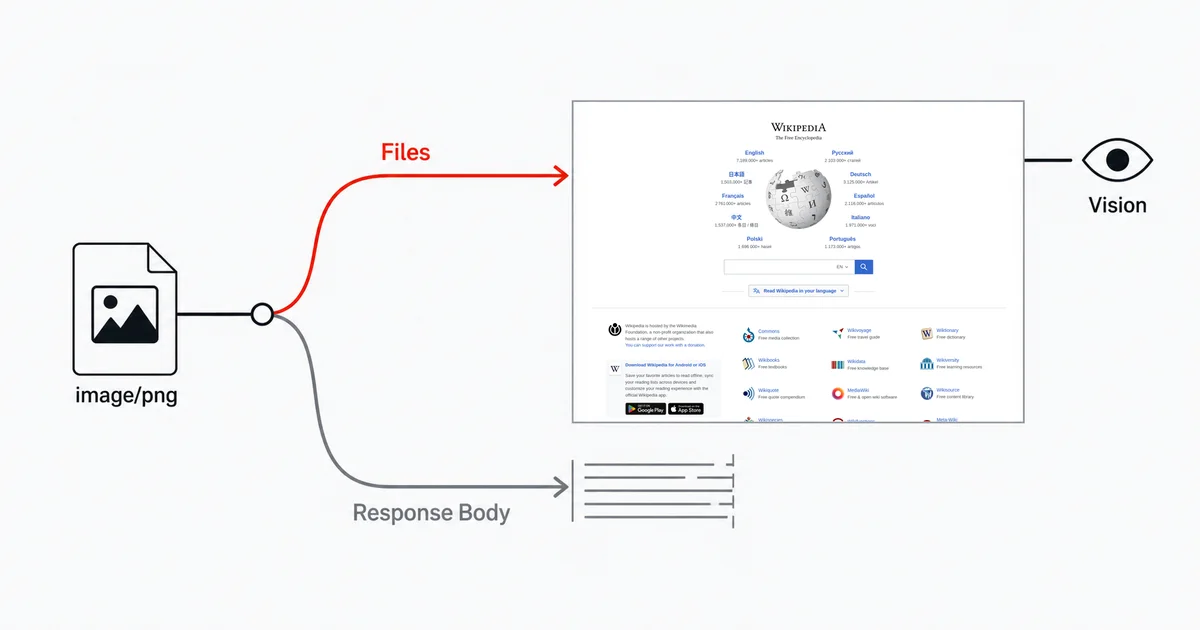
How Dify decides
Three steps, in order, quoted from the HTTP Request node documentation:
"1. Content-Disposition analysis - Checks for
attachmentdisposition or filename parameters 2. MIME type evaluation - Analyzes content types to distinguish text from binary 3. Content sampling - For ambiguous types, samples first 1024 bytes to detect text patterns"
And the outcome: "Text-based responses (JSON, XML, HTML, etc.) are treated as regular data, while binary content becomes file variables."
So the integration mode you want is the plain one — an endpoint that answers with Content-Type: image/png and a PNG body. Dify recognises it, and the image becomes a file variable you can pass to a vision LLM node, show in an Answer node, or return from an Output node typed file.
Do not use the API's base64 mode
For screenshots, Dify's binary file path is a better fit than embedding the image as base64 text. Text responses and workflow variables have separate size limits.
Text responses truncate at 1 MB. HTTP_REQUEST_NODE_MAX_TEXT_SIZE is documented as "Maximum text response size in bytes (1 MB). Responses larger than this are truncated." Truncated — not rejected. You get a data URL with its tail cut off and no error anywhere.
A single workflow variable caps at 200 KB. MAX_VARIABLE_SIZE is "Maximum size in bytes (200 KB) for a single workflow variable."
A base64-encoded screenshot is about a third larger than the PNG it encodes, so a 200 KB variable holds roughly a 150 KB image. That is a small thumbnail, not a page capture. The binary response limit is much larger: 10 MB by default.
The build
- HTTP Request node, method GET, URL
https://api.site-shot.com/. - Query parameters:
url,full_size=1,no_ads=1, andno_cookie_popup=1. - For the key, open the node's Authorization settings, choose Custom, set the header name to
userkeyand the value to your key — see below. - On the node's timeout settings, raise the read timeout. The default will not survive a real full-page render.
- Downstream, read the node's
Filesoutput — notResponse Body.
Then feed Files to an LLM node with vision enabled, and ask it whatever the screenshot was for.
Timeouts, and the tighter one you might not notice
Two numbers bound you, and they are not the same number.
The connect timeout ceiling is low — HTTP_REQUEST_MAX_CONNECT_TIMEOUT is 10 seconds, and "Per-node timeouts cannot exceed this." That is fine; establishing a TCP connection is fast.
The read timeout is the one that matters, and its ceiling is generous: 600 seconds. But you have to raise it deliberately. Leave it low and the node fails on exactly the heavy, slow-rendering pages that are the most interesting to screenshot.
There is a second path with a much tighter default. If you integrate through a Swagger-imported custom tool instead of the HTTP node, you inherit API_TOOL_DEFAULT_READ_TIMEOUT, which is 60 seconds — "Maximum time (in seconds) to wait for receiving response data from external APIs called by API Tool nodes." A cold full-page capture can exceed that, and the failure looks identical to a vendor problem.
The 10 MB ceiling
A binary response larger than 10 MB fails with ResponseSizeError — "API response exceeded the 10MB size limit." On Dify Cloud you cannot raise it.
A tall full-page PNG reaches 10 MB more easily than you would think — and there is no device-pixel-ratio to turn down, since the API renders at 1x. The fix has to happen on the capture side: a smaller width, a bounded max_height, or dropping full_size=1. Dify gives you no post-processing lever for this — and specifically, you cannot solve it in a Code node, because "Code runs in an isolated sandbox that blocks file system access, outbound network requests, and system commands." No fetching, no re-encoding.
Where the key goes
Dify's built-in auth on the HTTP node is header-only: Basic, Bearer, or a custom header. That sounds like a problem for an API documented with the key in the query string, and it is not — Site-Shot accepts the key as a request header too. A userkey: header with nothing in the query string returns the image, so choose Custom, set the header name to userkey, and the key never enters the URL at all.
If you are integrating an API that genuinely only reads a query-string key, interpolate it from a Secret-type environment variable, because:
"Secret-type environment variable values are masked in workflow run logs and in this node's request log."
A literal key typed into the URL can be exposed in saved workflow configuration and logs. Dify teaches that pattern in its own tutorials: "it is best not to directly enter the token value as plain text for security reasons... we can set token values in Environment Variables."
Two more things worth knowing:
Exporting an app can carry the secret with it. "If your app uses Secret-type environment variables, you'll be asked whether to include them in the export." Answer that question deliberately when sharing a DSL.
Hidden fields in a published web app are not secret. Dify says so plainly: "Hidden fields are not secret. Values travel in the URL query string and are visible in the browser address bar, browser history, and network traffic. For credentials and API keys, use Environment Variables instead."
Honest limits
Dify's own file URLs expire. Signed file URLs default to 300 seconds of validity — "After this time, the URL is rejected and the file must be re-requested." Anything that stores a Dify screenshot URL to use later — a Slack message, a database row, a report sent the next morning — will 404. Move the bytes somewhere durable inside the run.
The Code node cannot help you. Its sandbox has no network access and its string output is capped at 400,000 characters. It is for transforming data you already have, not for rescuing a binary problem.
No vendor-specific plugin is needed for this flow. The HTTP node returns the image as a file variable; a dedicated plugin is not a prerequisite.
A screenshot in a workflow is not monitoring. Dify is an excellent place to let a model look at a page as part of answering a question. Scheduled capture with alerting is a different tool entirely.
FAQ
Why does my screenshot come back as text instead of a file in Dify?
Because the HTTP Request node classified the response as text. Dify decides this itself using Content-Disposition analysis, MIME type evaluation, and sampling of the first 1024 bytes for ambiguous types. A response served as image/png with a PNG body is classified as binary and appears in the node's Files output rather than Response Body.
Should I use a screenshot API's base64 or JSON mode in Dify?
Prefer raw binary for screenshots. Dify documents a 1 MB text-response truncation limit and a separate 200 KB workflow-variable limit by default. A base64 image can exceed those limits; the binary response path allows 10 MB by default.
What causes ResponseSizeError on a screenshot in Dify?
A binary response over the 10 MB limit, which a tall full-page capture can reach on its own. On Dify Cloud that limit cannot be raised, so reduce the image at capture time with a smaller viewport or a bounded height. A Code node cannot help, because its sandbox blocks network access.
Why does my screenshot node time out on large pages?
The read timeout needs raising deliberately; its ceiling is 600 seconds but the default is much lower. Note also that a Swagger-imported custom tool uses a separate and tighter default read timeout of 60 seconds, which a cold full-page render can exceed.
Where should the screenshot API key go in a Dify HTTP node?
Use the node's Authorization settings. Site-Shot also accepts the key as a request header, so in the HTTP node's Authorization settings choose Custom, set the header name to userkey, and the key never enters the URL. For an API that genuinely only reads a query-string key, interpolate it from a Secret-type environment variable, whose values are masked in workflow run logs and in the node's request log.
Related reading
- How to Take Website Screenshots in n8n — the other self-hostable workflow tool, bounded by memory instead of variable size.
- How to Give a LangChain Agent Website Screenshots — the same vision-model goal, in code.
- AI Agent vs Screenshot API — when to render in the agent's own browser instead.
- Screenshot API documentation — every parameter used above.
Site-Shot answers a plain GET with a PNG and the right Content-Type, which is exactly what Dify's classifier is looking for — no base64 mode, no plugin to install. See the plans.