Most automation platforms make you fight their file model. GitHub Actions does not, and it is worth saying so before anything else: a run: step is a real shell on a real Linux VM, so this works exactly the way you would hope.
printf '%s' "$SITE_SHOT_KEY" | curl --fail-with-body --silent --show-error \
  --get "https://api.site-shot.com/" \
  --data-urlencode 'userkey@-' --data-urlencode 'url=https://example.com' \
  --output screenshot.png
Run this in Bash with SITE_SHOT_KEY already set. No base64. No data URLs. No "binary" mode buried in a dropdown. The file lands in the workspace and later steps can read it.
Which means an honest tutorial has to spend its length elsewhere — on the three things that actually go wrong. The worst of them ends with a passing build and no screenshot.
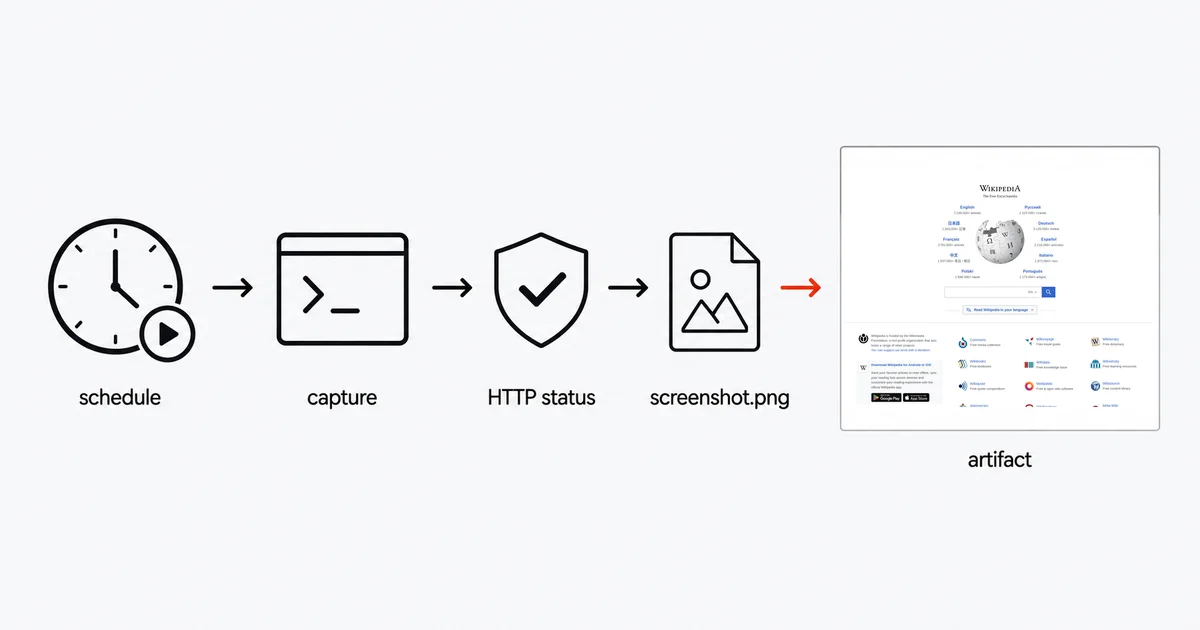
The short answer
Try a page in the free browser tool first — no signup needed. Unattended API captures require a paid plan. To use the workflow, create your account and follow the API setup steps, then store the key as the repository secret SITE_SHOT_KEY.
name: Daily screenshot
on:
  schedule:
    - cron: '17 4 * * *'   # deliberately not on the hour
  workflow_dispatch:        # so you can test it without waiting

jobs:
  capture:
    runs-on: ubuntu-latest
    timeout-minutes: 5
    steps:
      - name: Capture the page
        shell: bash
        env:
          SITE_SHOT_KEY: ${{ secrets.SITE_SHOT_KEY }}
        run: |
          : "${SITE_SHOT_KEY:?Set the SITE_SHOT_KEY repository secret}"
          printf '%s' "$SITE_SHOT_KEY" | curl --fail-with-body --silent --show-error \
               --get "https://api.site-shot.com/" \
               --data-urlencode "url=https://example.com" \
               --data-urlencode 'userkey@-' \
               --data "full_size=1&no_ads=1&no_cookie_popup=1" \
               --output screenshot.png

      - uses: actions/upload-artifact@v7
        with:
          path: screenshot.png
          archive: false
          if-no-files-found: error
          retention-days: 30
Four things in there are not decoration: --fail-with-body, archive: false, if-no-files-found: error, and the 17 in the cron. Each one exists because of a specific documented behaviour.
The green checkmark that lies
This is the failure worth the whole article, because nothing reports it.
Start with the shell. GitHub's default when you do not set shell: is bash -e {0}. There is no pipefail, and more importantly -e does not help you here at all — because plain curl exits 0 on an HTTP error. A 401 for a rejected key, a 429 for rate limiting, a 500 from anywhere: curl reports success and cheerfully writes the error body into the output file.
You now have a file called screenshot.png that contains {"message":"Invalid authentication credentials"}.
Then the second link in the chain. actions/upload-artifact's if-no-files-found input is documented as "Optional. Default is 'warn'", and warn is described as "Output a warning but do not fail the action."
Put those together and you get the whole chain: your API key expires, every run produces a JSON blob wearing a .png extension, the artifact uploads without complaint, and the workflow badge stays green for as long as you leave it. People discover this weeks later, when they finally open one of the artifacts.
The fix is two flags. --fail-with-body makes curl exit non-zero on an HTTP error while still letting you see the response body (useful — a missing key and a rejected one come back with different messages under the same status). And if-no-files-found: error makes a missing upload fail visibly.
Your artifact is a zip, not your PNG
Upload the file the obvious way and the person who clicks "download" in the run summary gets screenshot.zip.
That is by design. The archive input is documented as "Whether to zip the artifact files before upload / If 'false', only a single file can be uploaded. The name of the file will be used as the artifact name (the 'name' parameter is ignored) / Optional. Default is 'true'."
So archive: false gets you the raw image — with two conditions attached in the same documentation. You may upload exactly one file, and your name: input is ignored; the filename becomes the artifact name. If you are capturing five pages in a matrix and want them individually downloadable, you need five upload steps with five distinct filenames, not one step with a glob.
Scheduling is not as reliable as you think
Four documented behaviours, all of which bite unattended screenshot repos.
Cron is best-effort. GitHub states that "The schedule event can be delayed during periods of high loads of GitHub Actions workflow runs. High load times include the start of every hour. If the load is sufficiently high enough, some queued jobs may be dropped." Dropped, not delayed. This is why the example uses 17 4 * * * rather than 0 4 * * * — the top of the hour is exactly where the contention is.
Five minutes is the floor. "The shortest interval you can run scheduled workflows is once every 5 minutes."
Only the default branch runs. "Scheduled workflows will only run on the default branch." Testing a cron on a feature branch produces nothing at all, which is why the example pairs schedule with workflow_dispatch — that gives you a "Run workflow" button and a way to prove the thing works before merging.
Public repos auto-disable after 60 days. "In a public repository, scheduled workflows are automatically disabled when no repository activity has occurred in 60 days." A monitoring repo whose only activity is its own schedule generates no repository activity, so it dies on day 60. If that matters, the commit-back pattern below doubles as the cure.
Committing the screenshot back into the repo
The alternative to artifacts: keep the image in the repo, so it has a permanent URL and a visible history.
permissions:
  contents: write

# ...after the capture step:
      - name: Commit the screenshot
        run: |
          git config user.name  "github-actions[bot]"
          git config user.email "41898282+github-actions[bot]@users.noreply.github.com"
          git add screenshots/
          git diff --staged --quiet || git commit -m "chore: daily screenshot"
          git push
The permissions: block is mandatory, not optional: "By default, when you create a new repository in your personal account, GITHUB_TOKEN only has read access for the contents and packages scopes." Without it the push returns 403.
But be careful adding that block at all, because it is not additive: "If you specify the access for any of these permissions, all of those that are not specified are set to none." Listing only contents: write silently revokes everything else the job had.
One more thing that surprises people: the commit fires nothing downstream. "if a workflow run pushes code using the repository's GITHUB_TOKEN, a new workflow will not run even when the repository contains a workflow configured to run when push events occur." That is good protection against infinite screenshot loops, and bad news if you expected a Pages rebuild or a diffing workflow to pick it up.
Where the key goes, and where it leaks
Store the key as a repository secret and expose it through env:. Quoting "userkey=$SITE_SHOT_KEY" does not hide it from process arguments: Bash expands that value before launching curl. GitHub recommends environment variables or standard input instead of command-line secrets.
The example uses Bash's built-in printf to send the value over standard input; curl's userkey@- syntax reads and URL-encodes it. shell: bash enables pipeline failure checking in Actions, and the initial check fails before the request if the secret is missing. The secret is absent from curl's arguments, not from the resulting HTTP query. Use HTTPS, do not enable shell tracing or curl verbose/trace logging, and treat proxy/request logs as sensitive.
Two more facts worth internalising.
Redaction is not a guarantee. "Because there are multiple ways a secret value can be transformed, this redaction is not guaranteed. Additionally, the runner can only redact secrets used within the current job." And do not pack a JSON config containing the key into a single secret — "Structured data can cause secret redaction within logs to fail."
Fork PRs get nothing. "With the exception of GITHUB_TOKEN, secrets are not passed to the runner when a workflow is triggered from a forked repository." Combined with the rule that an unset secret evaluates to an empty string, a screenshot-on-PR workflow does not fail cleanly on an outside contributor's PR — it sends an unauthenticated request and fails as if the key were wrong.
Honest limits
Artifacts expire, and public repos cannot opt out. Default retention is 90 days. Private and internal repositories can be configured between 1 and 400 days; public repositories are capped at 90. The retention-days input itself only accepts 1 to 90.
Artifacts die with their run. Delete the workflow run and its artifacts go with it. If a screenshot is evidence rather than a convenience, push it to storage you control, or commit it.
Cost is asymmetric. Actions minutes are free on standard GitHub-hosted runners for public repositories. Private repositories draw on a plan quota — 2,000 minutes and 500 MB of artifact storage on Free, 3,000 and 1 GB on Pro — and overage is billed. A daily screenshot is trivially cheap either way; a per-commit matrix across fifty URLs is not.
Runners are ephemeral and generously timed. A job may run 6 hours, and timeout-minutes defaults to 360. Nothing about a screenshot needs that, but it does mean a hung request will burn a lot of quota before anything kills it. Set a real timeout-minutes on the job.
FAQ
Why does my GitHub Actions screenshot download as a zip file?
Because actions/upload-artifact archives files before upload by default. Set archive to false to get the raw PNG, but note two documented side effects: only a single file may be uploaded in that mode, and the name input is ignored because the filename becomes the artifact name.
Why is my workflow green when no screenshot was produced?
Two defaults combine into a silent failure. Plain curl exits 0 even on an HTTP 401 or 429 and writes the error body into the output file, and upload-artifact's if-no-files-found defaults to warn, which outputs a warning but does not fail the action. Use curl with the fail-with-body flag and set if-no-files-found to error.
Do I need base64 or a hosted URL to handle the image in GitHub Actions?
No. A run step executes on a real virtual machine with a real filesystem, so redirecting the binary response body straight into a file works. This is the main way GitHub Actions differs from no-code automation platforms, where the file model usually forces a URL or a base64 string.
Why did my scheduled screenshot workflow stop running?
Most likely the 60-day auto-disable. In a public repository, scheduled workflows are automatically disabled when no repository activity has occurred in 60 days, and a workflow that only runs its own cron generates no such activity. Scheduled runs are also best-effort, only run on the default branch, and cannot be set to intervals shorter than 5 minutes.
How should I pass a screenshot API key to curl in a workflow?
Put it in a repository secret and expose it through env. In Bash, pipe the built-in printf output into curl with data-urlencode userkey@- so the key is read from standard input, not expanded into curl's arguments. The resulting HTTP query still contains the key: use HTTPS and protect request logs. Disable shell tracing and fail before the request if the secret is missing.
Related reading
- How to Take Website Screenshots in Pipedream — the same job on a platform where returning the bytes is the mistake.
- How to Take a Website Screenshot with Python — the script you would put inside the run step.
- Automate Website Monitoring with Screenshots — what to do with a daily capture once you have one.
- Screenshot API documentation — every parameter used above.
Site-Shot answers a plain HTTP GET with a PNG, which is why the workflow above is one curl and no dependencies — no Chrome to install on the runner, no fonts to debug, no browser to keep up to date. Set up your API key or compare plans.