You need a picture of a web page from inside a serverless function: a preview for a link someone pasted, a check that a deploy rendered, a nightly copy of a page you watch. The usual answer is Puppeteer with @sparticuz/chromium, a Chromium build packed small enough for AWS Lambda and Vercel. npm counted 4.2 million downloads of it in the week of November 4–10, 2026.
It works, and it makes you the operator of a browser that has to fit the platform's size limit, match your Puppeteer version and stay healthy in containers you do not control. This guide covers what that involves as of November 2026, and the route that hands the browser to a screenshot API, with code for both platforms.
Disclosure: this guide is published by Site-Shot, and its second half uses our API. The Chromium and platform facts were checked against their own repositories and documentation in November 2026.
The short answer
| What the function captures | What to use |
|---|---|
| Public pages: link previews, deploy checks, archives | A screenshot API called from the function, no browser in the bundle |
| Your own HTML, rendered to a PDF | Chromium, or a PDF service: Site-Shot makes images, not PDFs |
| Pages behind a sign-in flow, on localhost or on a private network | Chromium, because you have to drive the browser or it has to reach your network |
For the first row the job is one HTTP request. Try a page in the free browser tool on the Site-Shot homepage first, with no signup, then make the same request with a key:
printf '%s' "$SITE_SHOT_KEY" | curl --fail -G -o preview.jpg "https://api.site-shot.com/" \
  --data-urlencode "url=https://www.wikipedia.org/" \
  --data-urlencode 'userkey@-' \
  -d width=1280 -d height=800 -d scaled_width=800 -d format=jpeg
That renders the page in a 1280×800 viewport and saves it scaled to an 800×500 JPEG. --fail keeps an HTTP error out of the file, and the key goes in on standard input, out of the process list. A confirmed account's API key comes with the free plan: 100 API captures a month, no card needed; paid plans start at $5/mo for 2,000. Get one at site-shot.com/start.
Puppeteer and Chromium in a function: what it takes in November 2026
None of this rules Chromium out. It is what you take on.
The binary has to fit
The @sparticuz/chromium README notes that its compressed browser is over 50 MB, and Lambda caps a directly uploaded zip at 50 MB. Its answer is @sparticuz/chromium-min, with the browser pack hosted at a URL or shipped in a layer. Lambda's ceiling for the unzipped function, layers included, is 250 MB.
Vercel's limit is also 250 MB uncompressed, and its documentation names "Puppeteer with its bundled Chromium" among the common causes of functions that exceed it. A beta allows up to 5 GB with Fluid compute and Active CPU; existing projects opt in with VERCEL_SUPPORT_LARGE_FUNCTIONS.
Once it fits, the README asks for at least 512 MB of memory and recommends 1,600 MB or more. The Lambda runtime has no fonts and the package ships only Open Sans (Latin, Greek and Cyrillic); other scripts need more fonts, in a layer or a fonts folder in the bundle.
The versions have to match
Each Puppeteer release prefers one Chromium version, and the README says to install the matching @sparticuz/chromium major. The newest build is 153, from September 11; pull requests for 154 to 157 have opened every two weeks since September 23, none is merged, and the 154 build failed. puppeteer-core 25.17.0, released November 10, prefers Chrome 157, and the last release that prefers 153 is 25.11.0: the latest Puppeteer is four versions past the newest build packed for a function.
Lambda's next Node.js runtime is not recognised
Version 153 decides it is on Lambda by looking for 20.x, 22.x or 24.x in the runtime name, and only then unpacks the shared libraries Chromium needs. Lambda's nodejs26.x runtime has been in public preview since August 2026; Node.js 26 reached Active LTS on October 28, and AWS's runtime table plans general availability for November 2026. Under that name the check returns false: we ran the published 153.0.0 code against each runtime name. The same check failed in November 2024, when nodejs22.x arrived: "error while loading shared libraries: libnspr4.so" (issue #318, fixed three days later).
For Vercel the check has a fallback, the VERCEL variable, which Vercel sets only when the project enables access to system environment variables; with that setting off, the fallback fails too.
Warm containers fill up with crash dumps
Issue #512, open since September 11, documents Chromium 152 crashing at browser teardown on nodejs24.x in about 8% of invocations. Each crash leaves a core dump of several hundred megabytes in /tmp; once they fill the disk, every render in that warm container fails with "Navigating frame was detached" rather than a disk error. Under a load that reuses containers the reporter measured 29.2% failures on 152 and 20.0% on 153, against 0% on 149; deleting core.* files from /tmp at the start and end of the handler took 600 invocations on 152 to zero failures. The last comment, on October 29, asks for progress.
On Vercel: a preview route that is not an open proxy
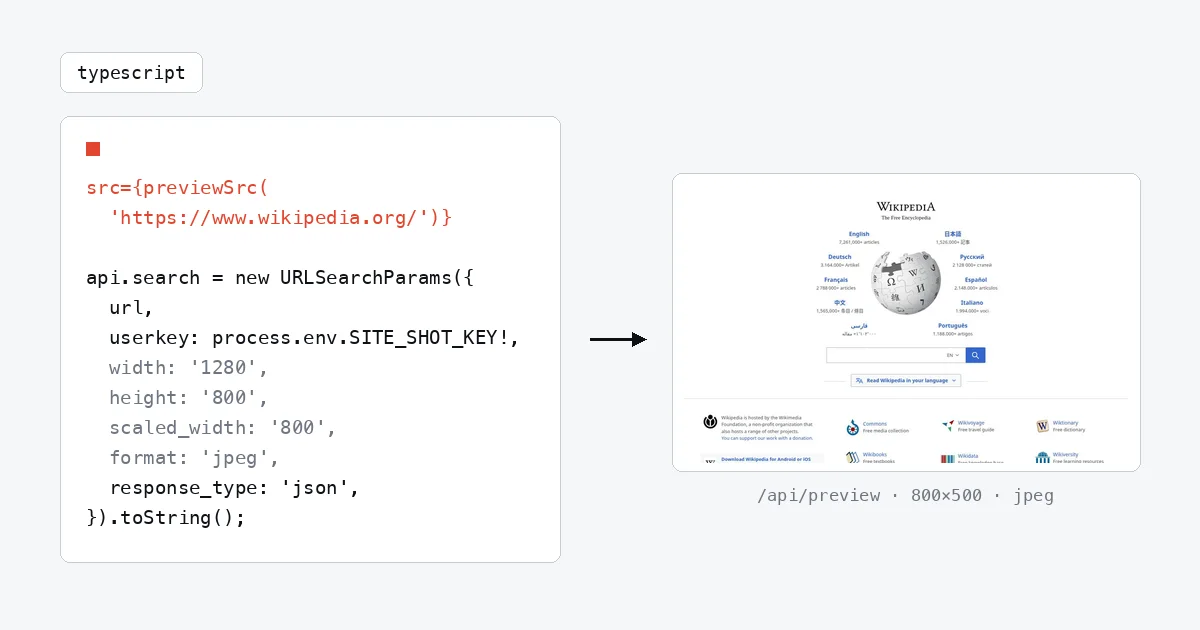
For link previews the function has three jobs: keep the key on the server, refuse URLs it did not issue, and capture each page once rather than on every view. One helper signs the URLs your pages render:
// lib/preview.ts (server only)
import { createHmac } from 'node:crypto';

export function previewSrc(url: string) {
  const sig = createHmac('sha256', process.env.PREVIEW_SECRET!).update(url).digest('hex');
  return `/api/preview?url=${encodeURIComponent(url)}&sig=${sig}`;
}
A Server Component uses it, so the secret never reaches the browser:
// app/page.tsx
import { previewSrc } from '../lib/preview';

export default function Page() {
  return <img src={previewSrc('https://www.wikipedia.org/')} width={800} height={500} alt="Wikipedia" />;
}
The route checks the signature, calls the API and decides what may be cached:
// app/api/preview/route.ts
import { createHmac, timingSafeEqual } from 'node:crypto';

export const maxDuration = 300;

export async function GET(request: Request) {
  const params = new URL(request.url).searchParams;
  const url = params.get('url') ?? '';
  const sig = Buffer.from(params.get('sig') ?? '', 'hex');
  const expected = createHmac('sha256', process.env.PREVIEW_SECRET!).update(url).digest();
  if (sig.length !== expected.length || !timingSafeEqual(sig, expected) || !/^https?:\/\//.test(url)) {
    return new Response('Forbidden', { status: 403 });
  }

  const api = new URL('https://api.site-shot.com/');
  api.search = new URLSearchParams({
    url,
    userkey: process.env.SITE_SHOT_KEY!,
    width: '1280',
    height: '800',
    scaled_width: '800',
    format: 'jpeg',
    response_type: 'json',
  }).toString();

  // Next.js stores a 200 answer for a day, keyed by this request, not by how the link was spelled.
  const reply = await fetch(api, { next: { revalidate: 86400 } });
  if (reply.status !== 200) {
    // A refused key, a spent allowance or too many parallel captures: cache nothing.
    return new Response(null, { status: 502, headers: { 'Cache-Control': 'no-store' } });
  }
  const shot = await reply.json();
  const page = shot.response?.status_code; // the status the page itself answered
  if (shot.error || !shot.image || !(page < 400)) {
    // The capture failed or the page answered an error: the CDN keeps the miss for a day.
    return new Response(null, { status: 404, headers: { 'Cache-Control': 'public, s-maxage=86400' } });
  }
  return new Response(Buffer.from(shot.image.split(',').pop(), 'base64'), {
    headers: {
      'Content-Type': 'image/jpeg',
      'Cache-Control': 'public, s-maxage=604800, stale-while-revalidate=86400',
    },
  });
}
Set SITE_SHOT_KEY and a long random PREVIEW_SECRET in the project's environment variables. Neither name starts with NEXT_PUBLIC_, so Next.js keeps both out of the browser bundle.
We ran the three files in next start (Next.js 16.4, Node.js 24) in 20 cases: six against the live API (two captures, then four respelled links that Next.js answered from its cache), ten stubbed API answers and four requests the route must refuse. Each answered as described below.
Why every URL is signed
A route that captures any ?url= is an open screenshot proxy: whoever finds it spends your plan. Every capture the API admits counts against the allowance, failed ones included. With an HMAC signature the route captures only URLs your own pages produced. timingSafeEqual compares the signature in constant time, and the length check runs first because it throws on inputs of different lengths. The scheme test rejects anything that is not an http or https URL.
Why the route asks for JSON
In image mode, a capture that could not reach the page comes back with status 404, an error-card image or an empty body, and no Content-Type header, and fetch() does not throw on a 404. With response_type=json the API answers 200 for every capture it runs: a non-empty error means it failed, and response.status_code is the status the page itself answered. The route serves an image only when there is no error and the page answered below 400.
That 200 also matters for cost: Next.js stores a fetch response only when its status is 200, so in JSON mode failed captures are stored too.
Caching, time and cost on Vercel
s-maxage=604800 lets Vercel's CDN keep each image for a week, and stale-while-revalidate for a day more while it refetches; Vercel strips both before the response reaches the browser. A failed capture is an empty 404 that the CDN keeps for a day. A refused request (a wrong key, a spent allowance, more parallel captures than the plan runs, one on the free plan) is a 502 with no-store, retried on the next view.
The CDN cache is per region, best-effort, keyed by the full URL and tied to the deployment, so a deploy, a region that has not seen the link or a respelled link reaches the function. There, next: { revalidate: 86400 } answers from the API response Next.js stored for up to a day, keyed by the API request, not the link; on Vercel that store survives deployments and is kept per function region. It holds items up to 2 MB; the image in this preview's answer took 74 KB.
maxDuration = 300 pins the limit in the code, overriding the project setting: under Fluid compute, on by default for projects created since April 23, 2025, 300 seconds is the default and the Hobby maximum. A function that runs out of time answers 504 (FUNCTION_INVOCATION_TIMEOUT), which the CDN does not cache. Waiting costs little: Fluid compute bills memory but not active CPU while the function waits for I/O.
On AWS Lambda: capture to S3 without a Chromium layer
For batch work, such as a nightly archive, the function writes each image to S3. A synchronous invocation's response is capped at 6 MB, or 200 MB streamed, and a full-page PNG of a long page can pass 6 MB:
// index.mjs (Node.js 24 runtime, no Chromium layer)
import { createHash } from 'node:crypto';
import { S3Client, PutObjectCommand } from '@aws-sdk/client-s3';

const s3 = new S3Client({});

export const handler = async (event) => {
  const params = new URLSearchParams({
    url: event.url,
    userkey: process.env.SITE_SHOT_KEY,
    full_size: '1',
    format: 'png',
    response_type: 'json',
  });
  const reply = await fetch(`https://api.site-shot.com/?${params}`);
  const shot = reply.status === 200 ? await reply.json() : {};
  const page = shot.response?.status_code; // the status the page itself answered
  if (shot.error || !shot.image || !(page < 400)) {
    // Log and return, do not throw: a thrown error makes Lambda retry an async event twice.
    console.error('capture failed', event.url, reply.status, shot.error || page);
    return { ok: false, status: reply.status, page };
  }
  const body = Buffer.from(shot.image.split(',').pop(), 'base64');
  // One object per page per day: the date, then a SHA-256 of the URL.
  const day = new Date().toISOString().slice(0, 10);
  const key = `screenshots/${day}/${createHash('sha256').update(event.url).digest('hex')}.png`;
  await s3.send(new PutObjectCommand({
    Bucket: process.env.BUCKET, Key: key, Body: body, ContentType: 'image/png',
  }));
  console.log('saved', event.url, key);
  return { ok: true, key, bytes: body.length };
};
It runs on the Node.js 24 runtime as one file: fetch is built in, and every supported Lambda Node.js runtime includes the AWS SDK for JavaScript v3. Like the route, it saves an image only when error is empty and the page answered below 400, and a page captured twice in a day overwrites one object. Give it SITE_SHOT_KEY and BUCKET as environment variables and s3:PutObject on arn:aws:s3:::BUCKET/*; images stay in the bucket until a lifecycle rule or you delete them. Invoke it with an event such as {"url": "https://www.wikipedia.org/"}, here asynchronously:
aws lambda invoke --function-name shot --invocation-type Event \
  --cli-binary-format raw-in-base64-out \
  --payload '{"url": "https://www.wikipedia.org/"}' response.json
Unless you configure a destination, an asynchronous invocation's return value goes nowhere, so the handler logs each outcome to CloudWatch. Under Node.js 24 against the live API, with S3 stubbed, a full-page capture of our own pricing page came back as a 1024×3392 PNG of 451 KB in 6.1 seconds. Two Lambda defaults need changing.
Raise the 3-second timeout
Lambda's default timeout is 3 seconds, shorter than any capture we measured, and a hard page can take minutes. With the default, the function gives up while the capture carries on and counts against your allowance. Use 300 seconds, the same limit as on Vercel; the same command sets the 256 MB the costs below assume (the default is 128 MB, and the image sits in memory before the upload):
aws lambda update-function-configuration --function-name shot --timeout 300 --memory-size 256
Return failures instead of throwing them
Amazon S3, Amazon SNS and an --invocation-type Event call invoke a function asynchronously, and then retries apply: if the function returns an error, "by default Lambda attempts to run it two more times", and timeouts count as errors. A thrown error turns one failed capture into three, so the handler logs the failure and returns { ok: false }. To rule out retries entirely, including after a timeout:
aws lambda put-function-event-invoke-config --function-name shot --maximum-retry-attempts 0
put-function-event-invoke-config replaces the function's existing asynchronous settings; update-function-event-invoke-config changes only the ones you pass. Lambda can also deliver an event more than once without any error, so a duplicate capture is possible.
What each route costs
On compute alone, your own Chromium wins. AWS's price for x86 functions in US East (N. Virginia) is $0.0000166667 per GB-second (checked November 2026). A capture that takes 4 seconds at the README's recommended 1,600 MB uses 6.25 GB-seconds, which is about $0.10 per 1,000 captures, plus $0.20 per million requests. The function in this guide spends about 5 seconds waiting at 256 MB: 1.25 GB-seconds, roughly $0.02 per 1,000 captures.
The API is the real cost. After the free plan's 100 captures a month, paid plans start at $5/mo for 2,000, which is $2.50 per 1,000 captures, and larger plans cost less per capture. Free-plan captures come from the default location or the US. That price buys the section above: no binary to fit, no versions to pair, no runtime list to wait for and no core dumps to sweep. At millions of captures a month, run the numbers with your own capture times.
Where the honest limits are
- Site-Shot makes images (PNG, JPEG or WebP), not PDFs, and its browser runs on our servers, so it cannot open localhost or a private network or run a sign-in flow for you.
- A capture takes seconds. In our runs from a laptop on November 12, 2026, captures took 4.2 to 6.1 seconds, except one that took 24.
- We ran both functions locally, as described above, and did not deploy them to Vercel or Lambda for this guide: platform behaviour, caches included, comes from Vercel's and AWS's documentation.
FAQ
Can I run Puppeteer on Vercel?
Yes, with a Chromium build made for functions such as @sparticuz/chromium, if the function stays under Vercel's 250 MB uncompressed limit or uses the large functions beta, which allows 5 GB. For screenshots of public pages it is simpler to call a screenshot API and ship no browser at all.
Why does Chromium fail with libnspr4.so on Lambda or Vercel?
@sparticuz/chromium did not recognise the environment, so it never unpacked the shared libraries Chromium needs. Version 153 recognises Lambda's Node.js 20, 22 and 24 runtimes but not nodejs26.x, and its fallback for Vercel is the VERCEL variable, which exists only when the project enables access to system environment variables.
Why do my Lambda screenshots start failing after a few dozen invocations?
Chromium 152 and 153 from @sparticuz/chromium sometimes crash at teardown and leave core dumps of several hundred megabytes in /tmp; once the disk is full, every later render in that warm container fails. The workaround reported in the issue is deleting core.* files from /tmp at the start and end of the handler.
How do I cache website screenshots on Vercel?
Return the image with Cache-Control: public, s-maxage=604800, and Vercel's CDN keeps it for up to a week, per region and per deployment. Fetch the API with next: { revalidate: 86400 }, and Next.js keeps its answer for up to a day across deployments, so a deploy or a respelled link costs no new capture. Ask Site-Shot for JSON, which answers 200 for failed captures too, so those are kept as well.
Related reading
- How to Take Website Screenshots in Cloudflare Workers — the same proxy where waiting costs no CPU time.
- How to Take a Website Screenshot with Node.js — plain Node and the SDK.
- Free PagePeeker or ShrinkTheWeb Thumbnails Broken? How to Replace Them — signed thumbnail URLs in PHP.
- Screenshot API documentation — every parameter used above.
Try any page free in your browser at site-shot.com, with no signup, or see the plans.