A retailer lists your product below its minimum advertised price on a Friday evening. By Monday it is back, and your notice gets the expected reply: that was never our price. A row in a spreadsheet saying "$31.99, Saturday" is easy to wave away. A record of the listing, made as a shopper in that market saw it, is much harder to dismiss.
This guide builds that record by hand for one listing in the free browser tool, then turns it into MAP monitoring: a short Python script captures every listing on your list from the United States through the Site-Shot API, reads the price where it can and saves a screenshot with a JSON record.
We ran it on 9 November 2026 against Amazon, Walmart and Ace Hardware listings, and the results below include where it fell short.
What a MAP violation record needs
Five things turn a typed price into a record someone else can check:
- The listing as a shopper saw it. The product page with the price next to the product name and the seller, not a crop of the price. On a marketplace the seller matters as much as the price.
- The URL, stored with the image. A page screenshot has no address bar, so the URL has to travel next to it.
- A capture time you didn't type. The script below takes it from Site-Shot's reply, in UTC, rather than from your own computer's clock.
- The market. Prices differ by country, store and ZIP code. Record the country, and keep the screenshot: it shows the store or delivery address the retailer picked.
- The price you read and the MAP you compared it with. That comparison is what a notice is about.
Check one listing in the browser, free
- Open site-shot.com and paste the listing's URL. Capturing is free and needs no signup.
- In the Country dropdown, select United States. The default, Direct connection, renders from our data center, which is not where your shoppers are.
- Tick full page, and leave No ads / No cookie ticked so a cookie banner doesn't sit on top of the price.
- Press Shot, check that the price, the product name and the seller are all in the picture, and click the download arrow under it (its tooltip says Download) to save the PNG. Note the URL and the time next to the file.
On a paid plan, tick Save to my library before you press Shot, and the capture lands in your library: a private record page with the image, its source URL, capture time and settings, which you can make public when you send it. Saving a web page as evidence walks through that record.
That covers the listing someone just forwarded you. Forty listings every morning need the API.
Automate MAP monitoring with a script
The script needs only Python 3's standard library, on a laptop or a small server. For each row of listings.csv it writes two files into an evidence folder in the directory you run it from: the screenshot as a PNG and a JSON record. That folder is your whole archive, so back it up.
It reads your API key from the SITESHOT_API_KEY environment variable. A confirmed account's API key comes with the free plan: 100 API captures a month, no card needed; paid plans start at $5/mo for 2,000. Get one from the API quickstart. Free-plan captures come from the default location or the US only, and the US is all this script asks for.
The list is a CSV with three columns:
sku,url,map_price
ECHO-DOT-5,https://www.amazon.com/dp/B09B8V1LZ3,40.00
VITAMIX-5200,https://www.walmart.com/ip/36707304,400.00
YETI-R20,https://www.acehardware.com/p/8016580,30.00
The MAP values here are made up, set below the prices we saw so that nothing in this guide reads as a violation; they are not those brands' policies. Put your own policy prices in that column.
And map_check.py:
import base64, csv, email.utils, hashlib, http.client, json, os, re, sys
import urllib.error, urllib.parse, urllib.request
from decimal import Decimal, InvalidOperation
from pathlib import Path

API = "https://api.site-shot.com/"
KEY = os.environ["SITESHOT_API_KEY"]

# Where the price sits in each retailer's HTML. Add a line per retailer, and
# expect to fix it when the retailer redesigns its product page.
PRICE_PATTERNS = {
    "www.amazon.com": r'<span class="a-offscreen">\s*\$([\d,]+\.\d{2})',
    "www.walmart.com": r'itemprop="price"[^>]*>\s*\$([\d,]+\.\d{2})',
}

# JavaScript run before the capture, for a retailer whose page opens a dialog
# over the listing. Walmart showed US visitors a consent dialog.
BEFORE_CAPTURE = {
    "www.walmart.com": "for (const b of document.querySelectorAll('button')) "
                       "if (b.textContent.trim() === 'Continue shopping') b.click();",
}

def capture(url):
    host = urllib.parse.urlsplit(url).hostname
    params = {
        "url": url, "userkey": KEY,
        "country": "US", "width": 1280,
        "full_size": 1, "max_height": 1600,
        "no_cookie_popup": 1, "fresh_session": 1,
        "response_type": "json", "source_code": 1,
    }
    if host in BEFORE_CAPTURE:
        params["javascript_code"] = BEFORE_CAPTURE[host]
    query = urllib.parse.urlencode(params)
    with urllib.request.urlopen(API + "?" + query, timeout=180) as response:
        # Site-Shot's clock, not this machine's: when the capture finished.
        taken = email.utils.parsedate_to_datetime(response.headers["Date"])
        return json.load(response), taken

def observed_price(url, html):
    pattern = PRICE_PATTERNS.get(urllib.parse.urlsplit(url).hostname)
    match = re.search(pattern, html) if pattern and html else None
    return Decimal(match.group(1).replace(",", "")) if match else None

out = Path("evidence")
out.mkdir(exist_ok=True)
with open(sys.argv[1], newline="", encoding="utf-8-sig") as listings:
    for row in csv.DictReader(listings):  # columns: sku,url,map_price
        try:
            map_price = Decimal(row["map_price"].strip().lstrip("$").replace(",", ""))
        except InvalidOperation:
            print(row["sku"], "skipped: map_price is not a number")
            continue
        try:
            result, taken = capture(row["url"])
        except urllib.error.HTTPError as error:
            if error.code in (401, 403):
                # The key, no plan or a used-up month: every row after this
                # one would fail the same way, so stop here.
                reason = error.read().decode()[:200]
                sys.exit(f'{row["sku"]}: HTTP {error.code} {reason}')
            print(row["sku"], "not captured: HTTP", error.code)
            continue
        except (OSError, ValueError, http.client.HTTPException) as error:
            # the network, a timeout, a reply cut off halfway
            print(row["sku"], "not captured:", error)
            continue
        page_status = str((result.get("response") or {}).get("status_code"))
        if result.get("error") or page_status != "200":
            print(row["sku"], "not captured:", result.get("error") or page_status)
            continue
        png = base64.b64decode(result["image"].split(",", 1)[1])  # a data URL
        safe_sku = re.sub(r"[^\w.-]", "_", row["sku"])  # a "/" can't go in a file name
        name = f"{safe_sku}-{taken:%Y%m%dT%H%M%SZ}"
        (out / f"{name}.png").write_bytes(png)
        price = observed_price(row["url"], result.get("source_code"))
        if price is None:
            status = "check the screenshot"
        elif price < map_price:
            status = "below MAP"
        else:
            status = "at or above MAP"
        settings = result.get("screenshot_parameters") or {}  # what the API applied
        record = {
            "sku": row["sku"], "url": row["url"],
            "country": settings.get("country"),
            "browser_location": settings.get("geolocation"),
            "captured_at_utc": taken.isoformat(),
            "map_price": str(map_price),
            "observed_price": None if price is None else str(price),
            "status": status, "screenshot": f"{name}.png",
            "sha256": hashlib.sha256(png).hexdigest(),
        }
        (out / f"{name}.json").write_text(json.dumps(record, indent=2))
        print(row["sku"], status, record["observed_price"] or "")
Run it with python3 map_check.py listings.csv. What the request asks for:
country=USroutes the capture through a US IP address and sets the browser's language, time zone and location to match.full_size=1withmax_height=1600keeps the top 1,600 px of the page, which on all three retailers held the product name, price, seller and delivery box. Withoutmax_heightyou get up to 20,000 px: Amazon's whole product page ran to 19,152 px and 7 MB.width=1280renders at a common laptop width instead of the default 1024 px.fresh_session=1starts every capture in a clean browser, with no cookies or local storage left over from an earlier capture, so each listing is seen by a new visitor.no_cookie_popup=1blocks cookie-consent banners, but not the consent dialog Walmart opened over the product name for our US captures;BEFORE_CAPTUREclicks that away throughjavascript_code, which the API runs in the page before the screenshot.response_type=jsonwithsource_code=1returns the screenshot inside a JSON reply, together with the rendered HTML of the page, which is where the script looks for the price.
A listing the API can't capture is printed as not captured with the reason, and the run moves on to the next one. A rejected key, a missing plan or a used-up month (HTTP 401 or 403) stops the run instead, since every row after it would fail the same way.
Reading the price is the fragile part
Each retailer needed its own pattern. When we looked on 9 November, none of the three product pages carried an offer price in JSON-LD, so Amazon's price comes from its a-offscreen span and Walmart's from its itemprop="price" element. When a retailer redesigns its product page, expect its pattern to stop matching, or worse, to match the wrong number.
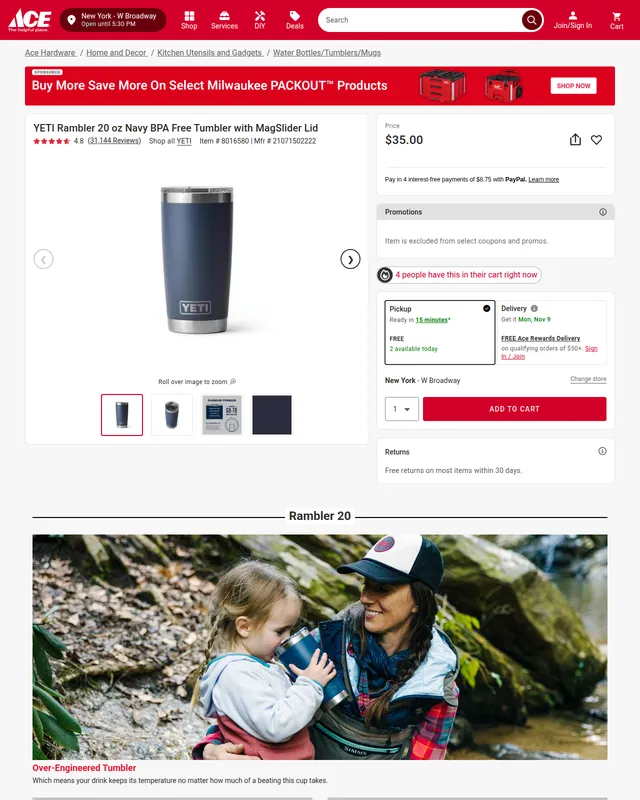
There is no pattern for Ace Hardware: twice that day the HTML that came back with its US captures was 3 KB and 44 KB of markup with no price in it, while the screenshot showed $35.00. That row comes out as check the screenshot, and a person looks. Keep that rule when you add retailers: a row without a price is a row to look at, never a pass.
What the runs returned on 9 November 2026
We ran the script three times in a row, between 18:28 and 18:33 UTC. The last run took 76 seconds for the three listings, one after another:
ECHO-DOT-5 at or above MAP 79.99
VITAMIX-5200 at or above MAP 449.99
YETI-R20 check the screenshot
The JSON record for the third:
{
  "sku": "YETI-R20",
  "url": "https://www.acehardware.com/p/8016580",
  "country": "US",
  "browser_location": "40.7128,-74.0060",
  "captured_at_utc": "2026-11-09T18:32:26+00:00",
  "map_price": "30.00",
  "observed_price": null,
  "status": "check the screenshot",
  "screenshot": "YETI-R20-20261109T183226Z.png",
  "sha256": "8d04282c21d5f2ae0249f41557b3621054cf2bc2836dd99bcd9ec077e08cbd38"
}
The three runs agreed on the prices, and the screenshots carried what the script doesn't read:
- Amazon named itself as the seller at $79.99 and delivered somewhere else each time: Ashburn, Virginia; Bend, Oregon; New York.
- Walmart showed a third-party seller's offer in the buy box, with a second seller listed below at a higher price.
- Ace Hardware showed $35.00 and a store in New York.
Other runs that day were less tidy: Walmart once put a "Robot or human?" check over the product name while the price behind it still parsed from the HTML, Ace Hardware once refused the capture with a 403, and an Amazon capture once timed out (not captured: 504). That is why the screenshot is the record and the parsed price only sorts the pile.
Your plan matters for some retailers. These captures ran on Site-Shot's own account, which includes the residential proxy retry: a capture a site rejects from a data-center address is tried again through a residential one. Walmart came through on the first attempt every time and Amazon in two runs of three; Ace Hardware only on the retry. Only the larger plans include it (the pricing page marks which), so on the free plan and the smaller paid plans expect Ace Hardware's rows to come out as not captured, and now and then an Amazon row too.
Before you act on a "below MAP" row
Open the screenshot first:
- Is it this product? Sizes, colors, bundles and multipacks often share one page, and a pattern can read the wrong one.
- Whose price is it? On a marketplace, note the seller the page names; the buy box can belong to someone else an hour later.
- Is it the advertised price? A coupon applied at checkout isn't on the page at all.
- Does it hold? Capture it again a few hours later; a price seen twice is harder to dismiss as a glitch.
Spot-check the passing rows too: a pattern that grabs a struck-through list price or another variant reports at or above MAP without complaint. After a retailer redesigns its pages, check all of its rows until its pattern is fixed.
Run it every morning
On a Linux server, keep the key in a file only you can read, out of the crontab and the script, and let cron run it:
# /srv/map/key.env (chmod 600)
export SITESHOT_API_KEY=your-key-here
# crontab -e: every day at 07:17 server time
17 7 * * * cd /srv/map && . ./key.env && { date -u; python3 map_check.py listings.csv; } >> run.log 2>&1
Each run adds a PNG and a JSON file per listing to /srv/map/evidence, and run.log keeps each run's date and console lines; read it now and then, because a refused key or a used-up month stops the run and cron won't tell you. Cron reads the schedule in the server's time zone; the records are in UTC regardless. The files stay until you delete them, so watch the disk: our three PNGs came to 0.4–1.1 MB each.
Every capture the API admits counts against the month, failed ones included. On the free plan's allowance that is a daily check of 3 listings (a month can hold 31 daily runs); a longer list needs a paid plan.
No server? On a paid plan a schedule can capture each listing every day, from the United States or another market, into your library. It keeps the dated screenshots but reads no prices; the MAP comparison stays with you.
Other markets and other retailers
Another country. Set country to the market's two-letter code and add strict_country=1: if the capture can't come from that country, the script prints not captured: country_unavailable instead of saving a page rendered through a US route. Countries other than the US need any paid plan; free-plan captures come from the default location or the US only. The current list is on the countries page, and the geotargeting guide explains how the routing works.
Another retailer. Save result["source_code"] for one of its listings, find the price the screenshot shows and turn the markup around it into a pattern; if the price isn't there, leave the retailer out of PRICE_PATTERNS. If a dialog covers the listing, add a click to BEFORE_CAPTURE.
Where the honest limits are
A capture can come back without an error and still not show the listing. A block page, a bot check or a consent wall can pass for a page while the price still parses from the HTML behind it. Look at the screenshot before any notice.
Some retailers turn automated visitors away. Ace Hardware rejected every first attempt from a data-center address. A retailer that loads today can refuse tomorrow, and a plan without the residential retry sees more of that.
The store and ZIP code are the retailer's call. country=US sets the country and a New York browser location, the browser_location in each record, but the retailer decides the rest: a New York store at Ace Hardware, Sacramento at Walmart, a different ZIP code in each run at Amazon. If your policy depends on the region, read it off the screenshot.
What a logged-out shopper sees, nothing more. Member prices, prices shown only in the cart and coupons applied at checkout won't appear for a new, logged-out visitor.
Your files, not a notarized record. The sha256 in each record stops matching if the PNG is edited, but it says nothing about the page, and both files live on your disk. The capture time comes from Site-Shot's server; Site-Shot does not provide notarization or an independent trusted timestamp. The capture methodology says what our records establish; ask counsel what your notices need.
FAQ
How do I capture evidence of a MAP violation? Capture the listing as a shopper in that market sees it, with the price, product and seller visible, and keep the URL, the UTC capture time, the country and the price you read next to the image. For one listing, the free Site-Shot browser tool does it: select United States in the Country dropdown and tick full page. For a list, a script can call the Site-Shot API with country=US and response_type=json and save a PNG and a JSON record per listing.
Can I capture US retailer listings for free? Yes. The free Site-Shot browser tool captures from the United States with no signup: select United States in the Country dropdown. Through the API, a confirmed account's key comes with the free plan — 100 API captures a month, no card needed — and free-plan captures come from the default location or the US only. Other countries need any paid plan; paid plans start at $5/mo for 2,000.
Why read the price from the HTML instead of the screenshot? A price in HTML can be matched exactly and cheaply, while reading it out of a screenshot needs OCR or a vision model. The HTML is not always enough: on 9 November 2026, Ace Hardware's US page showed $35.00 in the screenshot but not in the HTML returned with it. That is why the MAP script in this guide marks a listing without a parsed price for a manual check, and the screenshot stays the record either way.
Why does the capture show a different price than my browser? A Site-Shot capture is a different shopper from you: a new, logged-out visitor from the country you requested, with whatever store or delivery address the retailer assigns. Retailers vary prices by location, store and ZIP code, show members other prices and test changes on part of their traffic. Compare the capture with a logged-out browser in the same country.
Is a screenshot enough to enforce a MAP policy? A screenshot with its URL, capture time and market shows what a listing displayed at that moment. Whether that is enough to enforce a MAP policy depends on the policy, your agreements with retailers and your jurisdiction, so ask counsel. Site-Shot captures what the page showed; it does not provide notarization or legal advice.
Checking one listing? Capture it free — no signup — from the United States at site-shot.com. For a daily list, get an API key from the API quickstart; the paid plans on the pricing page add other countries and a private library for your captures.