Choosing a website screenshot API in 2026 usually comes down to two questions: how much does it cost at your volume, and how much engineering does it save you? Site-Shot and ScreenshotOne answer those questions very differently. Site-Shot focuses on low-cost Chromium rendering from a single GET request. ScreenshotOne is the premium, feature-rich option, with PDF and video output, native SDKs in seven languages, and a polished developer experience.
This post compares them fairly so you can pick the right tool. One thing up front, because it matters: Site-Shot's free, no-signup screenshot tool is the in-browser tool on its homepage — you paste a URL and get an image, no account, no key. The paid Site-Shot API (and the ScreenshotOne API) both require an account and an API key. The comparison below keeps these two options separate.
Disclosure: this comparison is published by Site-Shot. We've tried to keep the numbers accurate and the trade-offs honest — including where ScreenshotOne beats us. All prices were checked in August 2026; always confirm on each vendor's pricing page before you buy.
At a glance
| Feature | Site-Shot | ScreenshotOne |
|---|---|---|
| Free tier / no-signup | Yes — free in-browser tool, no signup, no API key | Yes — 100 screenshots/mo free (account required); no credit card |
| Entry price | $5/mo (X-Lite, 2,000 shots) | $17/mo (Basic, 2,000 shots) |
| ~Cost per 1,000 | $2.50 (X-Lite) | $8.50 (Basic) |
| Cost at scale | $0.80/1,000 (Professional, 625,000 shots) | $5.18/1,000 (Scale, 50,000 shots) |
| Full-page capture | Yes — up to 20,000px | Yes — full_page=true |
| Ad + cookie removal | Yes — no_ads, no_cookie_popup |
Yes — block_ads, block_cookie_banners |
| Geo / proxy | Yes — country proxies on every paid plan (IP, language, time zone, geolocation) | Yes — on Growth and Scale (ip_country_code, custom proxy, geolocation) |
| Scheduled captures | Yes — built-in schedules on every paid plan | No built-in scheduler — automate via Zapier/Make/n8n |
| Official MCP server | Yes — npx -y site-shot-mcp |
Yes — github.com/screenshotone/mcp |
| Native SDKs | Node.js and Python — npm install site-shot-sdk, pip install site-shot |
Yes — 7 languages (Go, Java, Ruby, Python, C#, PHP, JS/TS) |
The short version: Site-Shot is the budget pick — $2.50 per 1,000 at entry versus $8.50, with geo proxies and built-in scheduled captures on every paid plan. ScreenshotOne is the premium pick — PDF and video output, seven native SDKs, and caching that avoids charges on cache hits. Decide by whether you need more than images.
Pricing compared
Pricing is where the two diverge most clearly. Both bill by screenshot volume, and both have a free entry point, but the paid tiers sit at different price points.
Site-Shot's cheapest paid plan is X-Lite at $5/mo for 2,000 shots, which works out to $2.50 per 1,000. As you climb the tiers it gets dramatically cheaper: Lite is $15/mo for 10,000, Optimal is $50/mo for 50,000, and Professional is $500/mo for 625,000 shots — that last tier is $0.0008 per shot, or $0.80 per 1,000.
ScreenshotOne's cheapest paid plan is Basic at $17/mo for 2,000 shots, which is $8.50 per 1,000, with $0.009 per overage shot. Higher tiers improve the rate: Growth is $79/mo for 10,000 ($7.90/1,000) and Scale is $259/mo for 50,000 ($5.18/1,000). ScreenshotOne bills successful renders rather than cache hits; a cache miss can trigger a new billable render. This can help if you re-request the same URLs often.
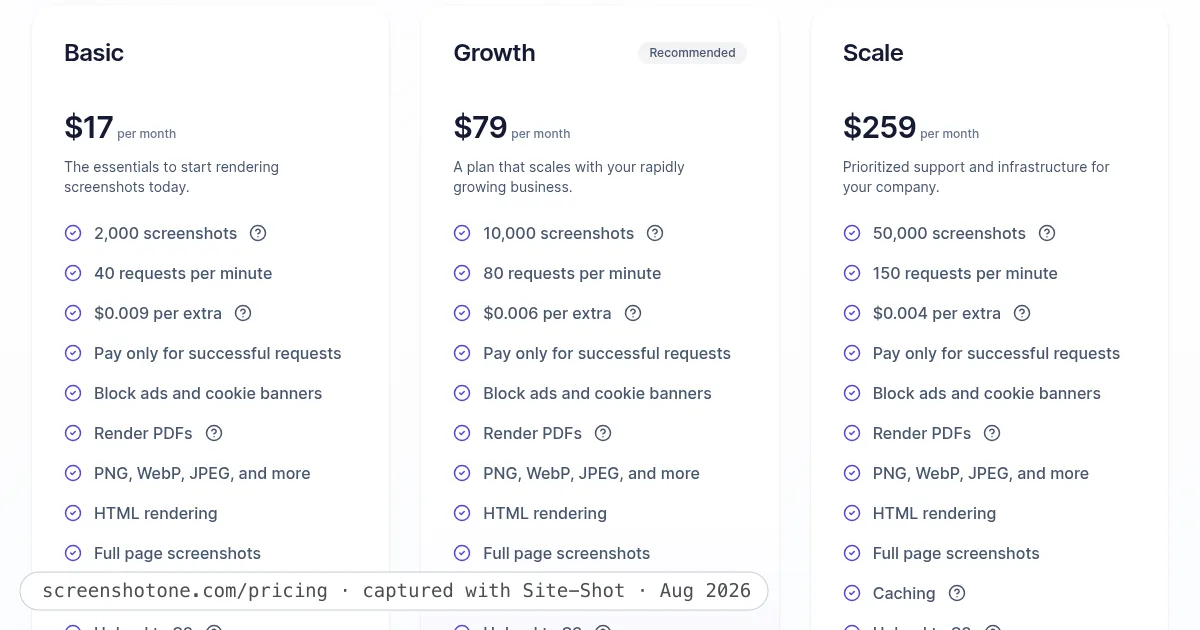
ScreenshotOne's live pricing page — captured with Site-Shot's own free tool (ads and cookie banners removed automatically), August 2026.
ScreenshotOne's higher price buys a broader feature set — the fair trade to keep in mind. Check Site-Shot pricing and ScreenshotOne pricing for current numbers.
Features compared
The core job — turn a URL into an image — both do well, with real browser rendering rather than a cheap HTML-to-image shortcut.
Site-Shot captures with real Chromium and returns PNG/JPEG, or JSON containing a base64 image plus the target page's response headers, all from a single GET request — no SDK required and no async job to poll. It supports full-page capture up to 20,000px, device and viewport emulation, country proxies on every paid plan, and automatic ad and cookie-banner removal. The design goal is "one request, one result," which keeps integration trivial in any language that can make an HTTP call.
ScreenshotOne is the more feature-rich, premium option. Alongside full-page capture, ad blocking, and cookie-banner removal, it adds capabilities Site-Shot does not have today: PDF rendering, MP4 / animated capture, WebP output, dark mode, direct S3 upload, async rendering with webhooks, and stealth mode. For geo targeting it offers a custom proxy option, ip_country_code, and explicit geolocation coordinates — IP-location choice is included on the Growth and Scale plans, not on Basic. If your project needs rendering beyond a static image, ScreenshotOne covers it natively.
The honest gap for Site-Shot: its SDK story is two languages deep. There are official Node.js and Python SDKs — npm install site-shot-sdk and pip install site-shot, zero dependencies each, thin wrappers over the same GET — but nothing for Go, Ruby, Java, C# or PHP, where you call the plain HTTP API directly. ScreenshotOne ships official SDKs in seven languages: Go, Java, Ruby, Python, C# (.NET), PHP, and JavaScript/TypeScript.
AI agents & MCP
Both vendors ship an official Model Context Protocol server, so an AI agent like Claude or a Cursor workflow can capture screenshots as a tool call rather than hand-rolling HTTP plumbing.
Site-Shot's MCP server runs with npx -y site-shot-mcp (registry id io.github.site-shot/site-shot-mcp) and exposes capture_screenshot and capture_full_page tools. ScreenshotOne's official server (github.com/screenshotone/mcp) is a TypeScript, MIT-licensed implementation maintained by the ScreenshotOne org, exposing a render-website-screenshot tool.
Site-Shot's edge here is cost — agents that fire a lot of captures benefit from the lower per-shot price — while ScreenshotOne's broader API output formats (PDF, video) require an integration beyond its JPEG-only CLI MCP capture tool.
When ScreenshotOne is the better choice
To be fair, ScreenshotOne wins in several real situations:
- You need more than images. PDF rendering, MP4 / animated capture, and dark-mode rendering are first-class features. Site-Shot does not offer these.
- You want a native SDK outside Node.js and Python. Site-Shot's official SDKs stop at those two, so if your team would rather
go getor pull a NuGet package than wrap a GET request, ScreenshotOne's seven SDKs are a genuine convenience. - You need pipeline plumbing built in. Direct S3 upload, async rendering with webhooks, and stealth mode are baked in, which can save you from building that infrastructure yourself.
- You value caching economics. Not billing for cached screenshots can offset the higher per-shot price for workloads that repeatedly request the same URLs.
It's the premium, most feature-rich option in this comparison, and that premium is doing real work.
When Site-Shot is the better choice
Site-Shot is the better fit when:
- Cost per shot is the priority. At $2.50/1,000 entry and $0.80/1,000 at scale, Site-Shot is several times cheaper than ScreenshotOne at comparable volumes — the bigger the volume, the bigger the gap.
- You want zero-signup, zero-key for one-off captures. The free in-browser tool needs no account and no API key, which is great for quick manual grabs or trying it out.
- You want the simplest possible integration. A single GET returns the image (or JSON with base64 plus the target's response headers) — no SDK, no async job, no polling.
- You need long full-page captures or country proxies on a budget. Full pages up to 20,000px and country-specific proxies come with every paid plan, plus automatic ad and cookie-banner removal.
- You want a visual history without building a scheduler. Scheduled captures are built in on every paid plan: the same URL, same settings, captured on a cadence you choose and filed in your library. ScreenshotOne has no built-in scheduler (Zapier/Make/n8n or cron).
If your needs are "good screenshots, cheaply, with minimal code," Site-Shot is hard to beat.
FAQ
Is ScreenshotOne or Site-Shot cheaper?
Site-Shot has lower per-shot rates on the published plans compared here. Its cheapest paid plan is X-Lite at $5/mo for 2,000 shots ($2.50 per 1,000), versus ScreenshotOne's Basic at $17/mo for 2,000 shots ($8.50 per 1,000). At scale the gap grows: Site-Shot's Professional plan reaches $0.80 per 1,000, while ScreenshotOne's Scale tier is about $5.18 per 1,000. ScreenshotOne's higher price buys a broader feature set, including PDF and video output and SDKs in seven languages against Site-Shot's two, for Node.js and Python.
Does Site-Shot work with AI agents / MCP?
Yes. Site-Shot ships an official MCP server you can run with npx -y site-shot-mcp (registry id io.github.site-shot/site-shot-mcp). It exposes capture_screenshot and capture_full_page tools for Claude, Cursor, and other MCP-compatible agents. ScreenshotOne also offers an official MCP server, so both work in agent workflows.
Do I need an account or API key to use Site-Shot?
For the free in-browser tool on the homepage, no — there is no signup and no API key. For the paid Site-Shot API you do need an account and an API key (SITESHOT_API_KEY). The same is true of ScreenshotOne: its API requires an account and a key, though it also offers 100 free screenshots per month without a credit card.
Which one should I choose for full-page screenshots?
Both support full-page capture. Site-Shot handles full pages up to 20,000px and is the cheaper option per shot. ScreenshotOne also supports full-page capture (full_page=true) and adds extras like PDF output and async rendering. Choose Site-Shot for cost-efficient image capture, or ScreenshotOne if you also need PDF, video, or SDKs beyond Node.js and Python.
Can Site-Shot take screenshots on a schedule?
Yes. Scheduled captures are built into Site-Shot on every paid plan: you pick a URL and a cadence, and each capture is filed in your library as a browsable visual history — no cron, no external automation. ScreenshotOne has no built-in scheduler; recurring captures there are typically wired up through Zapier, Make, n8n, or your own cron. See the guide to automatic daily screenshots.
For a wider view, see our full 8-tool comparison.
Try the free no-signup screenshot tool or compare API plans on the pricing page.